Home > Training > Faculty > Submit Category I Form
Submit Category I Form
This article provides step-by-step instructions for completing a Category I prior approval form. When filling out the form, include detailed information about your role in the outside professional activity and upload any necessary supporting documentation. After submitting the Category I form, it will proceed through your campus’s approval workflow. You will receive email notifications if the form is returned for revisions and when a final decision is made on your request.
- UC OATS allows faculty to request up to five years of prior approval. However, most campuses limit prior approval requests to one year at a time. Check your campus policy before requesting approval for multiple years.
- Once a Category I prior approval form is approved, it cannot be deleted from UC OATS. If the approved activity did not occur during the fiscal year, record this by adding an activity note stating that you did not engage in the activity.
To complete the Category I form:
- Confirm you are submitting the Category I form in the correct fiscal year. If your activity is in the wrong fiscal year, you can move the activity to the correct fiscal year.
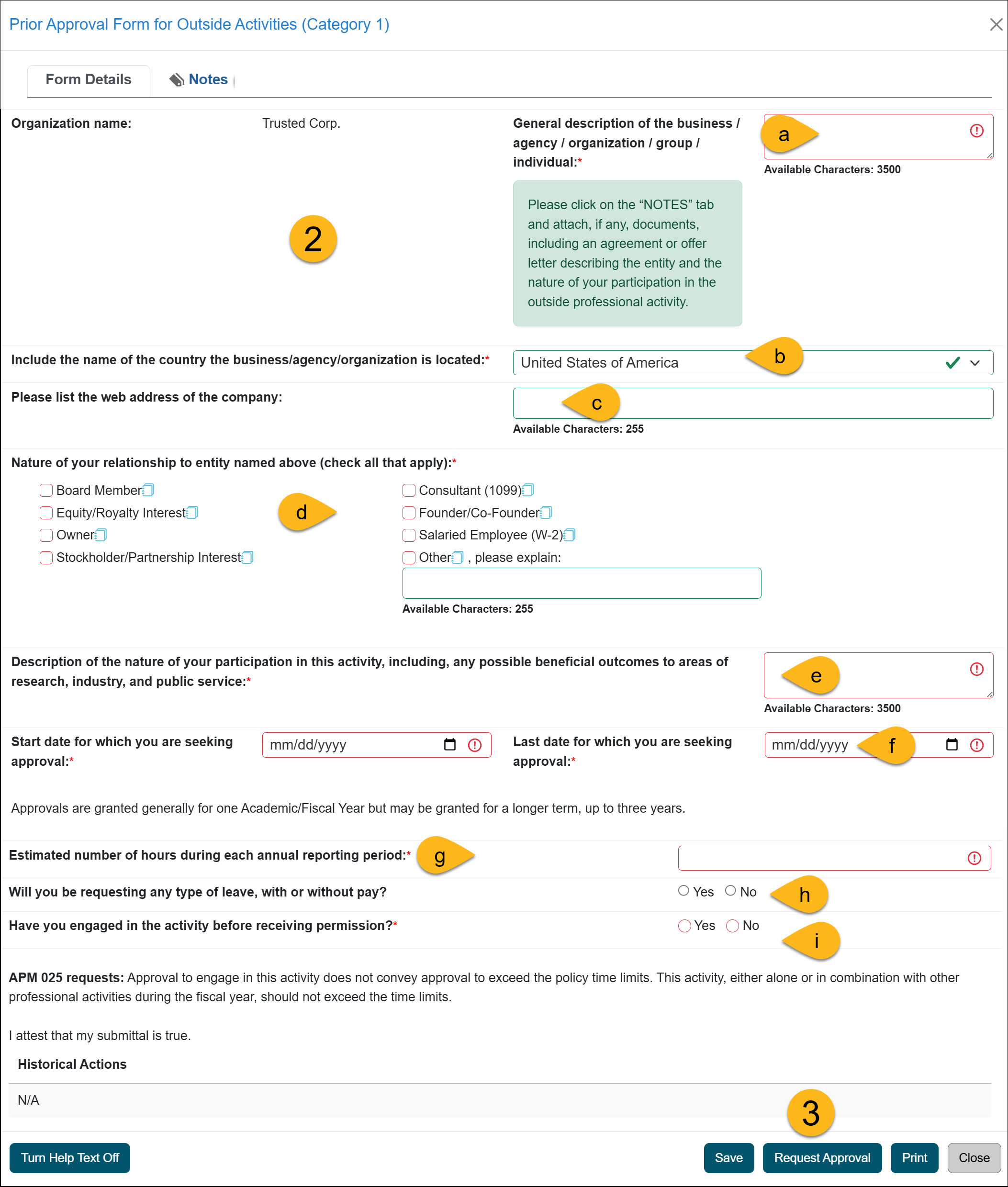
- Complete the Category I form. Below are the details about each field.
Form DescriptionNo
Form Question Description a
General description of the business [required] Enter a description of the business.
b
Include the name of the country the business/agency/organization is located [required] Select the country where the organization is located.
Note: UC OATS uses AI to help identify the company’s location and provide supporting evidence.
c
Web address [optional] Enter the web address of the company with which you will be working.
d
Nature of your relationship to the entity [required] Select all options that apply.
- Board Member - board member with governance responsibilities
- Equity / Royalty Interest - Equity is one's ownership state in a legal entity. A royalty payment is made to the legal owner of the property, patent, copyrighted work or franchise.
- Owner - The one who has the legal or rightful title of ownership.
- Stockholder / Partnership Interest - A stockholder is an individual, group, or organization that holds one or more shares in a company, and in whose name the share certificate is issued. Also called a shareholder. A partnership interest in an association of two or more persons engaged in a business enterprise in which the profits and losses are shared proportionally.
- Consultant (1099) - For tax purposes, you will receive an IRS 1099 form for this activity.
- Founder / Co-Founder - The founder of a business or a company is the person who establishes it; a co-founder is a joint founder.
- Salaried Employee (W-2) - For tax purposes, you will receive an IRS W-2 form for this activity.
- Other, please explain - Other professional activities that common sense and good judgment would indicate are likely to raise issues of conflict of commitment. See APM - 671-10-a-(1) or APM-025-10-a-(1).
e Description of the nature of your participation [required] Please include enough detail to help a reviewer understand your role in this activity. If you need more space than the field allows, upload a Word document with your description to the Notes tab. f Start & end date for which you are seeking approval. [required] Select the dates for which you are requesting approval to engage in the activity. Approvals are typically granted for one academic or fiscal year, but may be approved for a longer period—up to three years—depending on campus policy. Refer to your campus help site for campus-specific guidance. g Estimated number of hours, engaging in activity before permission. [required] - Estimated number of hours - Enter the number of hours of involvement during an Academic or Fiscal Year appointment.
- Have you engaged in the activity before receiving permission - State whether or not you have engaged in the activity before receiving permission.
h Will you be requesting any type of leave, with our without pay? (APM-671 only) [required] Select Yes if you will be requesting leave. i Have you engaged in the activity before receiving permission? [required] Answer if you engaged in an activity before receiving approval. k Notes [optional] Upload supporting documentation or add additional notes regarding the activity.
- Click the Request Approval button to submit the form. Once submitted, the form will process through your campus approval workflow, which will vary per campus. You will receive an email notification once your Category I form has been reviewed.
Last Modified:2026-01-08 14:27:56.723183-08