Home > Training > Faculty > Submit Request to Exceed Threshold
Submit Request to Exceed Threshold Form
A Request to Exceed Threshold form is used when you exceed—or expect to exceed—your approved time and/or earnings threshold for an outside professional activity. Submitting this form allows the University to review and approve the additional time or earnings associated with that activity.
When an Exceed Threshold form is approved, it increases the time and/or earnings threshold for the specific activity only. If you expect to exceed thresholds for more than one activity, you must submit a separate Exceed Threshold form for each activity, as approvals apply individually, not globally.
- If you exceed the approved threshold for an activity again, a new Request to Exceed TH form will be generated.
- You cannot cancel an Exceed Threshold form unless you remove the effort that caused you to exceed the threshold. As long as the activity remains over the threshold, the form must be completed and submitted.
General Campus Faculty (APM-025)
This article explains how Exceed Threshold forms are generated, including the required workaround for requesting approval in advance.
General Campus Exceed Threshold
There are two ways a Request to Exceed Threshold form can be generated:
- Time/Earnings Threshold has been exceeded: If a faculty member’s reported time exceeds the established threshold, an Exceed Threshold form is automatically generated. The form will appear with a "Not Submitted" status and must be completed.
- The form remains required as long as the faculty member stays above the threshold.
- If the reported time falls below the threshold, the form can be canceled.
-
Workaround- Request to Exceed Threshold in Advance: General Campus faculty do not have the option to request to exceed the threshold in advance. However, a workaround is available.
To request to exceed your time threshold in advance, you must temporarily report effort above your threshold (for the amount you want to request) for the activity. Once the form is generated, you may delete the excess effort and submit the form.
Submit Exceed Threshold Form
To submit the Request to Exceed form:
- Select the Request to Exceed TH form.
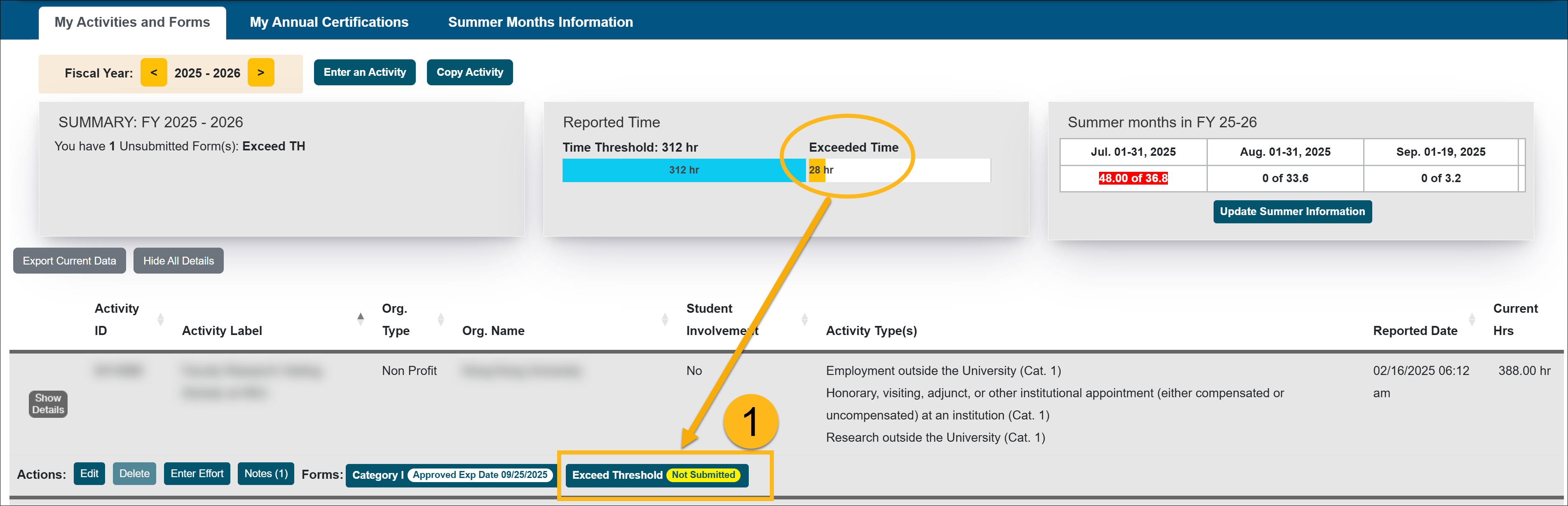
- Enter an estimate of how many hours you expect to devote to the activity.
Note: If you exceed your approved activity time threshold, another Exceed Threshold form will be generated. To prevent multiple forms, it is good practice to provide a generous estimate of how much time you plan on devoting to the activity.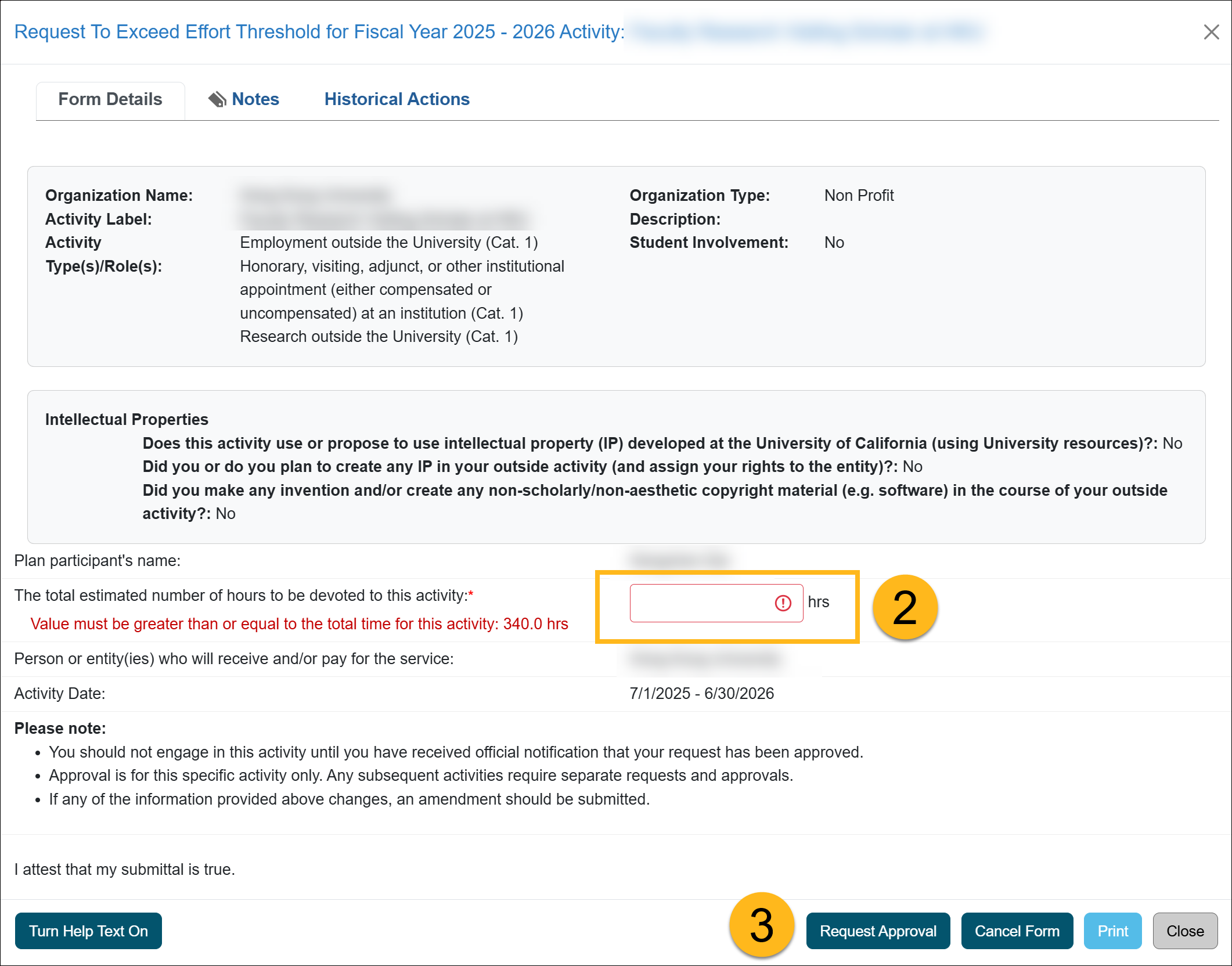
- Click the Request Approval button to submit the form. Once submitted, the form will process through your campus approval workflow, which will vary per campus. You will receive an email notification with the decision, or if the form is returned to you.
Note: You cannot cancel the form unless you delete the effort that exceeded your threshold. As long as you are over the threshold for that activity, the form must be submitted.
Health Science Faculty (APM-671)
This section explains how to submit an Exceed Threshold form.
Health Science Exceed Threshold
There are two ways a Request to Exceed Threshold form can be generated:
- Request to Exceed Threshold in Advance: Health Sciences faculty may have the option to submit an Exceed Threshold form in advance. The form can be accessed from the "Forms" section within the activity. Note: This feature may not be enabled at all UC campuses.

- Time/Earnings Threshold has been exceeded: If a faculty member’s reported time or earnings exceed the established threshold, an Exceed Threshold form is automatically generated. The form will appear with a "Not Submitted" status and must be completed.
- The form remains required as long as the faculty member stays above the threshold.
- If the reported time/earnings fall below the threshold, the form can be canceled.
Submit Exceed Threshold Form
To submit an Exceed Threshold form:
- Open or generate an Exceed Threshold form.
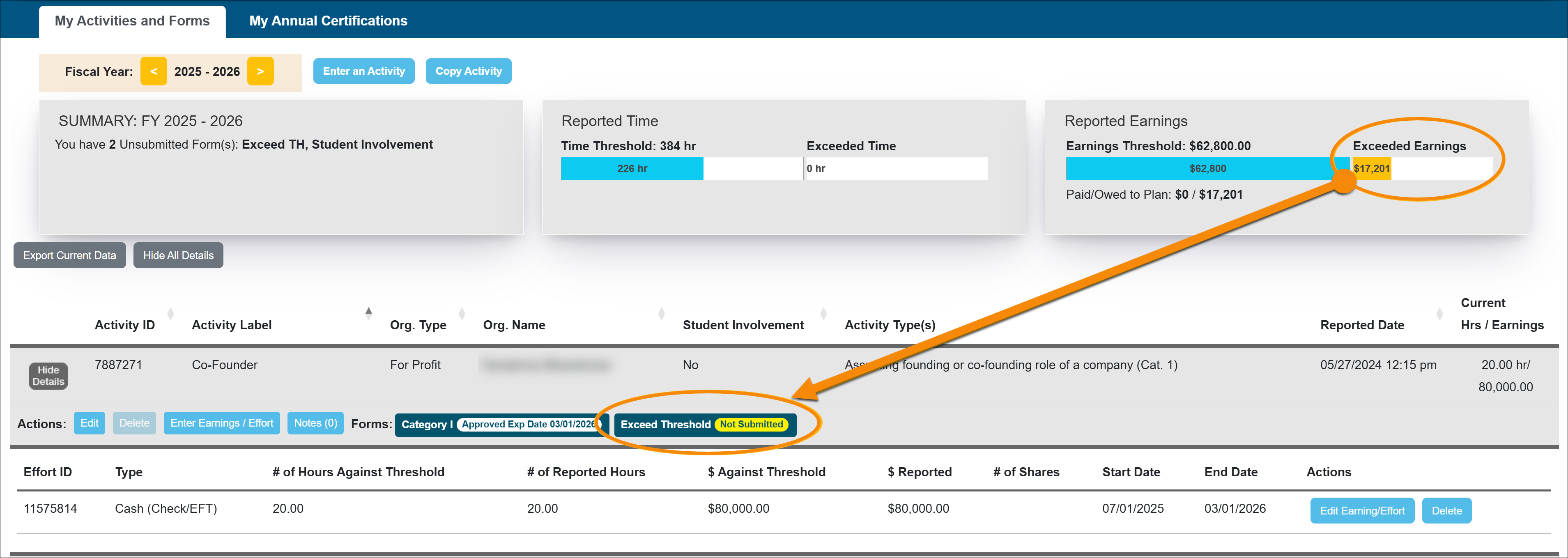
- Fill out the form. Enter the number of hours and earnings you expect from this activity.
Note: If you exceed your approved activity threshold, another Exceed Threshold form will be generated. To prevent multiple forms, it is good practice to provide a generous estimate of how much time/earnings you plan on devoting to the activity.
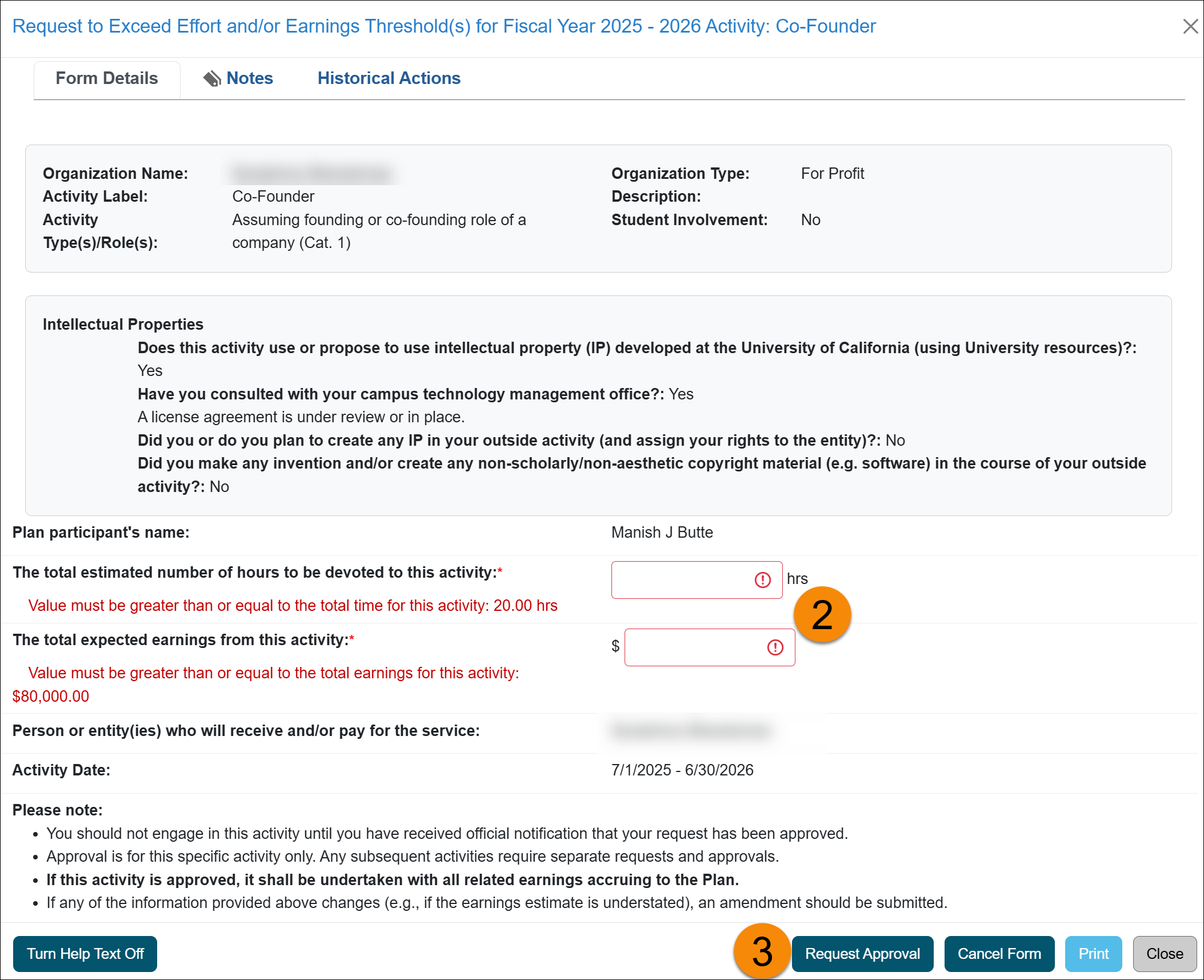
- Click the Request Approval button to submit the form. Once submitted, the form will process through your campus approval workflow, which will vary per campus. You will receive an email notification with the decision, or if the form is returned to you.
Note: You cannot cancel the form unless you delete the effort that exceeded your threshold. As long as you are over the threshold for that activity, the form must be submitted.
Related Articles
All Faculty
Enter an Activity
Submit Category I Form
Category I: Organization Country Verification
Submit Student Involvement Form
Submit Request to Exceed Threshold Form
Submit Retain Earnings Form
Enter Summer Information
Duplicate Activity Found Pop-up
Last Modified:2026-01-09 14:13:28.183483-08