Home > Training > Reviewer > Separate Faculty in UC OATS
Separate Faculty in UC OATS
This article explains how to process a faculty member’s separation in UC OATS. A faculty member should be separated from UC OATS when they are no longer subject to APM‑025 or APM‑671 reporting requirements.
Common reasons for separating a faculty member include:
- They are leaving the University
- They no longer hold a faculty appointment
- They no longer hold a title covered by APM‑025 or APM‑671
- They are subject to APM‑025, and their appointment has dropped below 50%
- They are no longer a participant in the Health Sciences Compensation Plan (APM‑671)
It is recommended that the faculty member submit their Annual Certification for the current fiscal year before or at the time of separation, whenever possible.
- Only Reviewers with the 'Faculty Status Change' role can mark a faculty as separated.
- Faculty will have access to UC OATS until the university removes their UC logon rights.
- If Annual Certification is enabled, the faculty member will receive an Annual Certification email reminder.
What Happens After a Faculty Member Is Separated
The following will provide information on what happens to the faculty's account when you process a separation.
System actions after separation
| Scenario | UC OATS System Actions | Comments |
| Faculty member separates during the fiscal year without submitting their Annual Certification. | If a faculty member has not submitted their Annual Certification and is separated during the fiscal year, they are excluded from the Not Submitted Annual Certification report. Only active faculty with outstanding certifications are included in this report. | |
|
All future activities |
UC OATS will delete future activities, prior approval forms, and effort/earnings. | For Example: Faculty A has reported activities in fiscal year 2025–2026. The faculty member’s separation date is June 30, 2025 (fiscal year 2024–2025). Because the separation date occurs before the start of fiscal year 2025–2026, UC OATS deletes all activities, prior approval forms, Annual Certifications, and appointments associated with fiscal year 2025–2026 and all future fiscal years. |
|
Faculty with Category I forms in process or approved for future fiscal year(s): A faculty member anticipates the need for a Category I activity in an upcoming fiscal year and submits the Category I prior approval form in advance. The faculty member later decides to leave the University during the current fiscal year. |
When the separation is processed, all Category I forms for future fiscal years—including forms that are not submitted, in review, or already approved—are deleted. | UC OATS documents the deletion of Category I forms in the System Messages section of the Faculty Details page. |
|
Faculty with Annual Certification in process or approved for future fiscal year(s) |
When the separation is processed, all Annual Certifications—including ones that are not submitted, in review, and approved are deleted. |
UC OATS documents the deletion of Annual Certification in the System Messages section of the Faculty Details page. |
|
Retrospective separation: A faculty member leaves the University, but the separation is not reflected in UC OATS for multiple fiscal years because appointment records were not updated. As a result, UC OATS continues to treat the faculty member as active and flags them as delinquent for Annual Certifications. |
Reviewers must retrospectively process the faculty member’s separation for the period during which they were no longer employed, and then update the faculty member’s current appointment records to reflect their return. | A statement will appear beneath the faculty's name that says the faculty was separated [fiscal year]. UC OATS will display system messages documenting the retrospective separation and the affected fiscal years. |
How to Separate Faculty
To separate a faculty in UC OATS:
- Select the Faculty tab.
- Select the fiscal year that corresponds to the faculty member’s separation date.
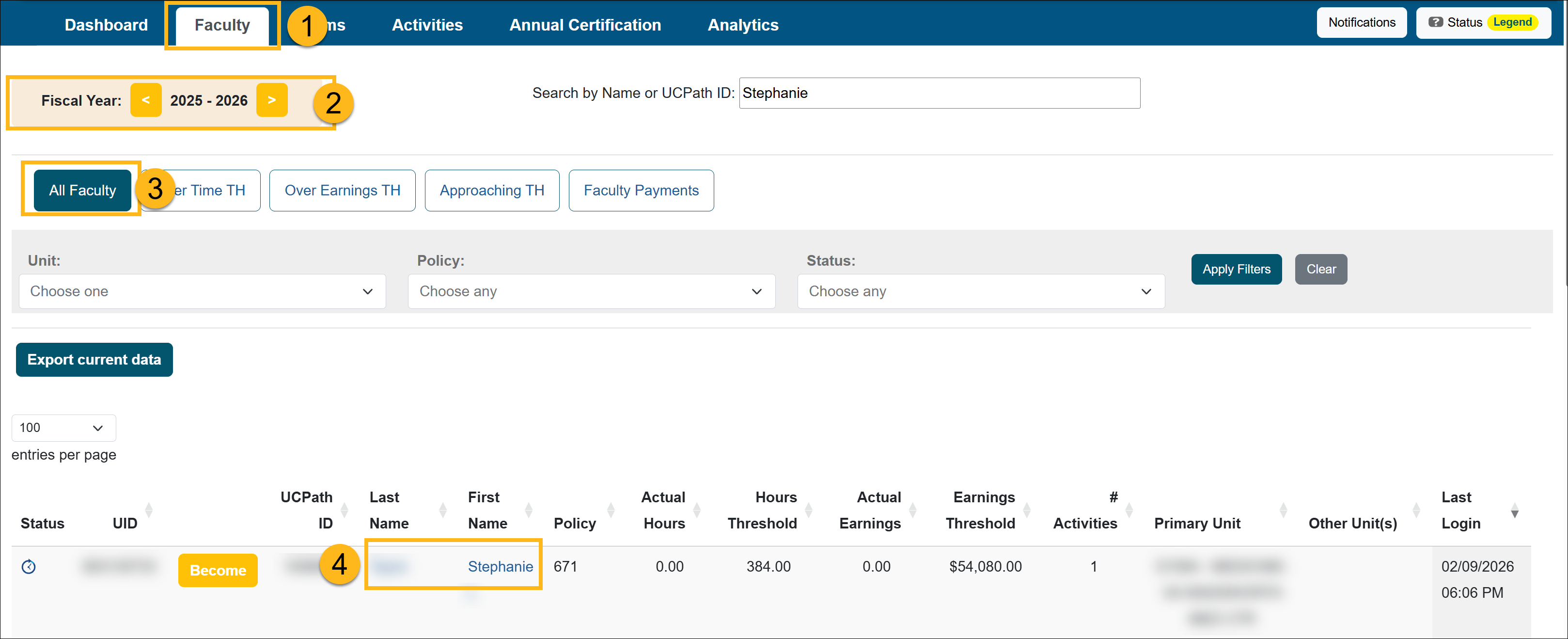
- Select All Faculty.
- Locate the faculty member who is separating from the University and select their name to open the Faculty Details page.
- In the Fiscal Status section, complete the following:
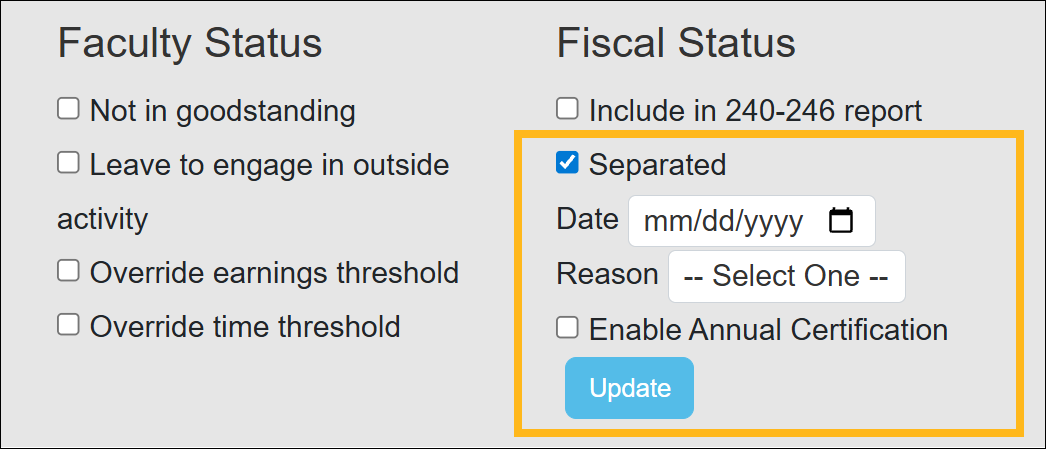
- Separated: Select the Separated checkbox.
- Date: Select the Separation Date. The date must fall within the fiscal year you selected.
- Reason: Select the reason for separation (Separated, Deceased, Retired, or Other).
- Enable Annual Certification:
- Select this option if you want the faculty member to complete Annual Certification.
- This makes the certification option available in the faculty member’s workspace.
- When enabled, the faculty member will receive Annual Certification email reminders.
- Select Update to finalize the changes.
Once the separation is processed, UC OATS removes all future appointments, activities, forms, and Annual Certifications associated with the faculty member.
Related Articles
All Reviewers
Manage Faculty Email Subscriptions
Undelete Faculty Activities
Faculty and Fiscal Status Indicator
Override Faculty Thresholds
Separate Faculty in UC OATS
Leave to Engage in Outside Activity
Add Faculty to 240-246 Report
Last Modified:2026-02-17 12:05:20.893996-08