Home > Training > Reviewer > Manage Faculty Email Subscriptions
Manage Faculty Email Subscriptions
This article explains how to manage a faculty member’s email notification subscriptions in UC OATS.
By default, faculty are subscribed to all system‑generated email notifications. Faculty cannot manage their own email subscription preferences. If a faculty member requests to unsubscribe from a specific email type, a reviewer or administrator can update the faculty member’s email subscriptions on their behalf.
Faculty Email Notifications
The following is what is included in the emails sent to faculty. The content may vary by campus.
Email Notification Content
| Email Name | Content |
|
Cat 1 Form Full Expiration Time |
Subject: "@ACTIVITY_NAME@" @ACTIVITY_TYPE@ will expire soon Body: The @ACTIVITY_TYPE@ approval request for the activity "@ACTIVITY_NAME@" will expire in less than @CAT1_DAYS_TO_EXPIRATION@ days. Reminder: Approval of Category I activities is not guaranteed, therefore, each Category I request must be submitted for consideration in advance of the commencement of the activity. Failure to include all of the required details may result in a delay of review. Final approval must be received in advance or a violation of university policy concerning Conflict of Commitment could result. Final approval must be received before continued engagement in your Category 1 activity. |
|
Cat 1 Forms Half Expiration Time |
Subject: "@ACTIVITY_NAME@" @ACTIVITY_TYPE@ will expire soon Body: The @ACTIVITY_TYPE@ approval request for the activity "@ACTIVITY_NAME@" will expire in less than @CAT1_DAYS_TO_EXPIRATION@ days. Reminder: Approval of Category I activities is not guaranteed, therefore, each Category I request must be submitted for consideration in advance of the commencement of the activity. Failure to include all of the required details may result in a delay of review. Final approval must be received in advance or a violation of university policy concerning Conflict of Commitment could result. Final approval must be received before continued engagement in your Category 1 activity. |
| Email sent out to faculty when income of the type of Stock as Compensation, Stock Purchase Agreement or Stock Options is created |
Subject: Documentation required for @REMUNERATION_TYPE@ Body: Dear @FACULTY_NAME@: Extra documentation required for @REMUNERATION TYPE@ |
| Email sent out when an Annual Certification is returned to faculty |
Subject: Annual Certification was returned Body: This is a system automated email and does not accept replies. Dear @FACULTY_NAME@: Your Annual Certification for fiscal year @FISCAL_YEAR_RANGE@ was returned: @MESSAGE@ Regards, |
| Email sent when a faculty has a forms pending for more than a week |
Subject: You have forms pending submission Body: Dear @TO_NAME@: The following are the approval forms that have not been submitted yet: @APPROVAL_FORMS_SUMMARY;noquote@ |
| Faculty Separated with Annual Certification Enabled |
Subject: Faculty Separated with Annual Certification Enabled Body: Dear @FACULTY_NAME@: Annual reporting of outside professional activity is required. To report your outside professional activities, please log in to UC OATS. After verifying that all activities are entered, click the Annual Certification tab to review and submit. If there are no Category I or II activities to report, faculty must still submit an annual report certifying that they did not engage in any Category I and II activities. Department Reviewers and Department Chairs and/or Deans will need to review and approve the annual reports. |
| Outside Activities Reminder for Faculty |
Subject: Requirement to Disclose Outside Professional Activities in UC OATS Body: Dear @FACULTY_FIRST_NAME@ @FACULTY_LAST_NAME@: Purpose: This memo serves to remind all faculty members under the Health Sciences Compensation Plan (HSCP) of their obligation to report all their outside professional activities accurately in UC OATS throughout the fiscal year starting from July 1st through June 30th of the subsequent year. Policy Overview: As part of our commitment to maintaining transparency and compliance with APM-671, it is crucial that all faculty members covered under HSCP keep a running total of their earnings and of time effort from all Category I and Category II activities, whether compensated or uncompensated, throughout the year. This includes earnings and time spent from all sources unrelated to the terms of employment with UCLA. Timely planning of the transfer of responsibilities and/or funds from federal grants or other sources must also be considered when processing a Leave of Absence under APM-740 and APM-700 (e.g., sabbatical leave) . It is imperative that Category I Prior Approval Form submission, leave request, and initiation of transfer of responsibilities be done before the activity is performed. The Category I form and Leave request require submission to the Academic Affairs and Personnel Office 2 months prior to the start of the activity for review and approval. Thus, we are requesting submission of these requests to my office 3 months prior to the start of activity. Additionally, evidence of transfers must be submitted to my office. The list of Category I and Category II activities to be reported include:
Reporting Requirements:
|
| Stock Valuation Complete |
Subject: OATS Notification - Stock Valuation Complete Body: Dear @FACULTY_NAME@, Thank you for disclosing your non-cash compensation, which has been valuated and added to your outside professional activity earnings total. Please check UC OATS for the valuation information. |
| Student Involvement Approval Notification |
Subject: @ACTIVITY_NAME@ @ACTIVITY_TYPE@ has been @DECISION_VERB@ Body: Dear @TO_NAME@: The @ACTIVITY_TYPE@ prior approval request for the following has been @DECISION_VERB@: Please note that you can view approval details on your faculty dashboard by logging into OATS. You are responsible for logging into OATS to view any notes related to your approved activity. If there are any substantive changes to the approved activity, it is your responsibility to seek consultation about whether or not a new request should be submitted for review and approval. If this approval is for a Category I activity, remember to report your effort (and/or earnings for health sciences). |
| When a cat1 form associated with an Activity (UNIQUE ID) is denied. |
Subject: @ACTIVITY_NAME@, @ACTIVITY_TYPE@ has been @DECISION_VERB@ Body: Dear @TO_NAME@: The @ACTIVITY_TYPE@ prior approval request for the following has been @DECISION_VERB@: @NOTE@ You may log in to UC OATS to view any notes related to the denial of your request. To find the notes, click on the orange note icon located to the left of the activity ID or click on the “Cat I Approval (Denied)” button located in the “Form/Queue” column and then click the “Notes” tab located in the upper left corner. |
| When an approval request has been approved (Cat 1, Exceed TH and Retain Earnings) |
Subject: @ACTIVITY_NAME@ @ACTIVITY_TYPE@ has been @DECISION_VERB@ Body: The @ACTIVITY_TYPE@ prior approval request for the following has been @DECISION_VERB@: Please note that you can view approval details on your faculty dashboard by logging into OATS. You are responsible for logging into OATS to view any notes related to your approved activity. If there are any substantive changes to the approved activity, it is your responsibility to seek consultation about whether or not a new request should be submitted for review and approval. If this approval is for a Category I activity, remember to report your effort (and/or earnings for health sciences). |
| When an approval request has been submitted (Cat 1, Exceed TH, Student Involvement and Retain Earnings) |
Subject: @ACTIVITY_NAME@ @ACTIVITY_TYPE@ has been submitted Body: Dear @TO_NAME@: The @ACTIVITY_TYPE@ prior approval request for the following has been submitted and is now under review: |
| When an approval request is sent back to faculty (Cat 1, Exceed TH, Student Involvement and Retain Earnings) |
Subject: @ACTIVITY_NAME@ @ACTIVITY_TYPE@ has some feedback Body: Dear @TO_NAME@: The @ACTIVITY_TYPE@ prior approval request for the following has been sent back to you with some feedback: @NOTE@ |
| When an exceeding of earnings threshold occurs |
Subject: OATS Notification - Action Required Body: Dear @FACULTY_NAME@, This is to notify you that you have exceeded the earnings threshold by $ @EARNINGS_AMOUNT@. If you plan to participate in any additional outside professional activity in @FISCAL_YEAR@, you must obtain prior approval to engage in each activity that exceeds the earnings threshold. Please complete the Request to Exceed Threshold form in UC OATS. |
| When an exceeding of effort threshold occurs |
Subject: OATS Notification - Action Required Body: Dear @FACULTY_NAME@, This is to notify you that you have exceeded the time threshold by @TIME_AMOUNT@ hours. If you plan to participate in any additional outside professional activity in @FISCAL_YEAR@, you must obtain prior approval to engage in each activity that exceeds the time threshold. Please complete the Request to Exceed Threshold form in UC OATS. |
Manage Email Subscriptions
To manage a faculty member's email subscriptions:
- Select the Faculty tab.
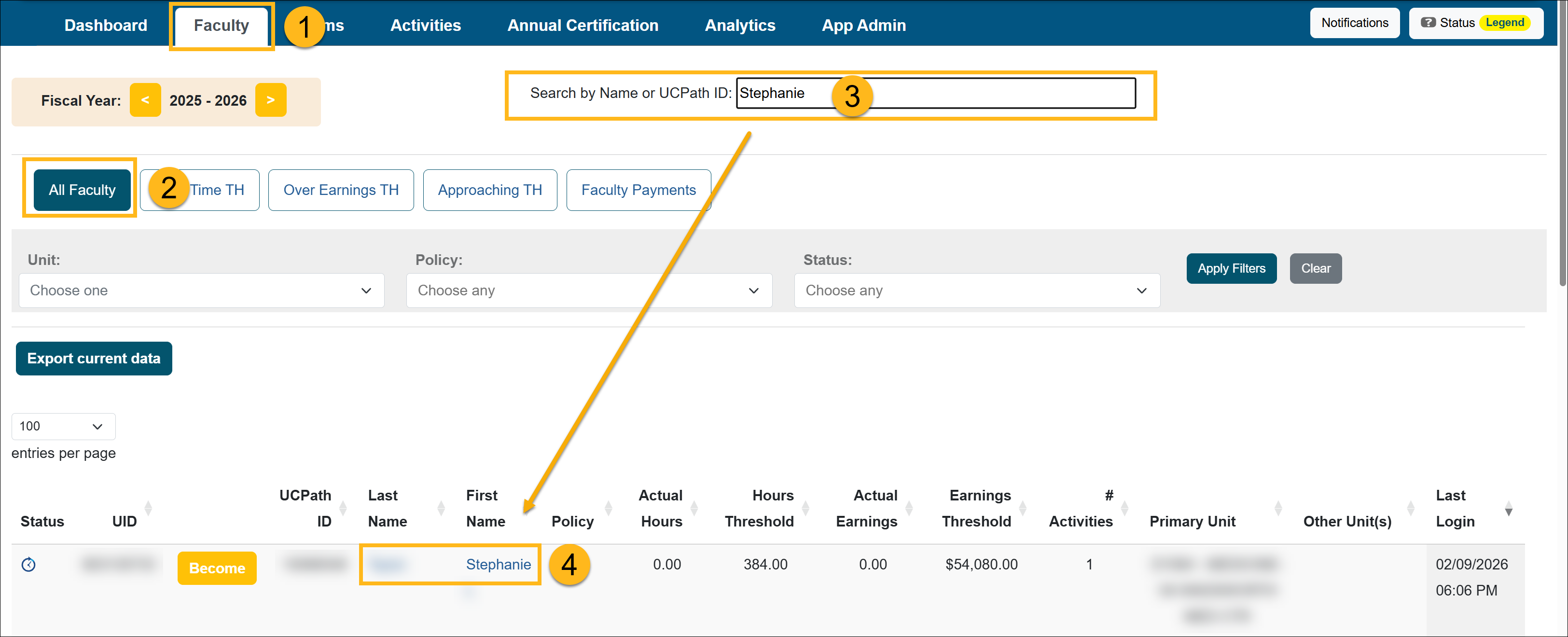
- Select the All Faculty button.
- Locate the faculty member from the list. Use the search bar as needed.
- Select the faculty member's name to access the Faculty Details page.
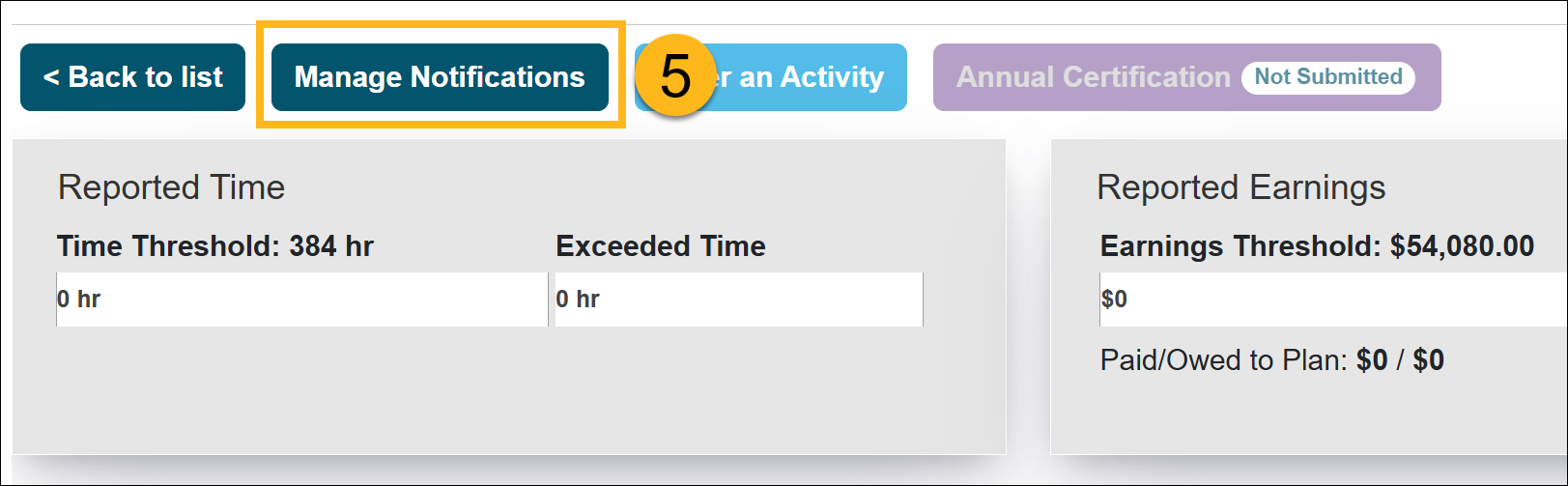
- Select the Manage Notifications button.
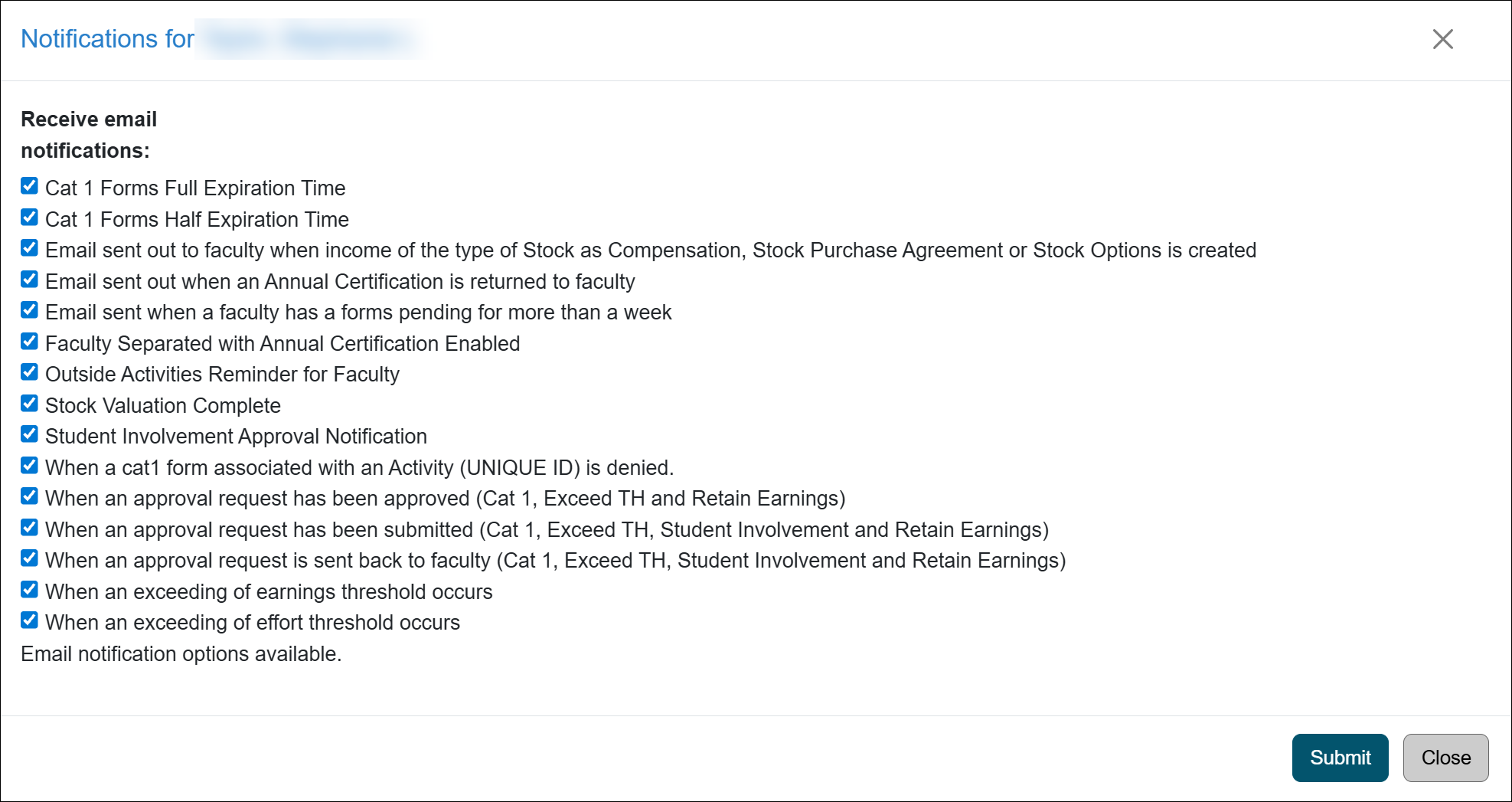
- Deselect the email options to unsubscribe the faculty from them. Click Submit to finalize the changes.
Related Articles
All Reviewers
Manage Faculty Email Subscriptions
Undelete Faculty Activities
Faculty and Fiscal Status Indicator
Override Faculty Thresholds
Separate Faculty in UC OATS
Leave to Engage in Outside Activity
Add Faculty to 240-246 Report
Last Modified:2026-02-18 08:40:30.535772-08