Home > Training > Reviewer > Forms search - Include subunits
Forms Search - Include Subunits
Reviewers can use the Include subunits filter on the Forms tab to search an organizational unit and all its subunits at once, eliminating the need to search each subunit individually.
To use the subunits filter:
- Navigate to the Forms tab.
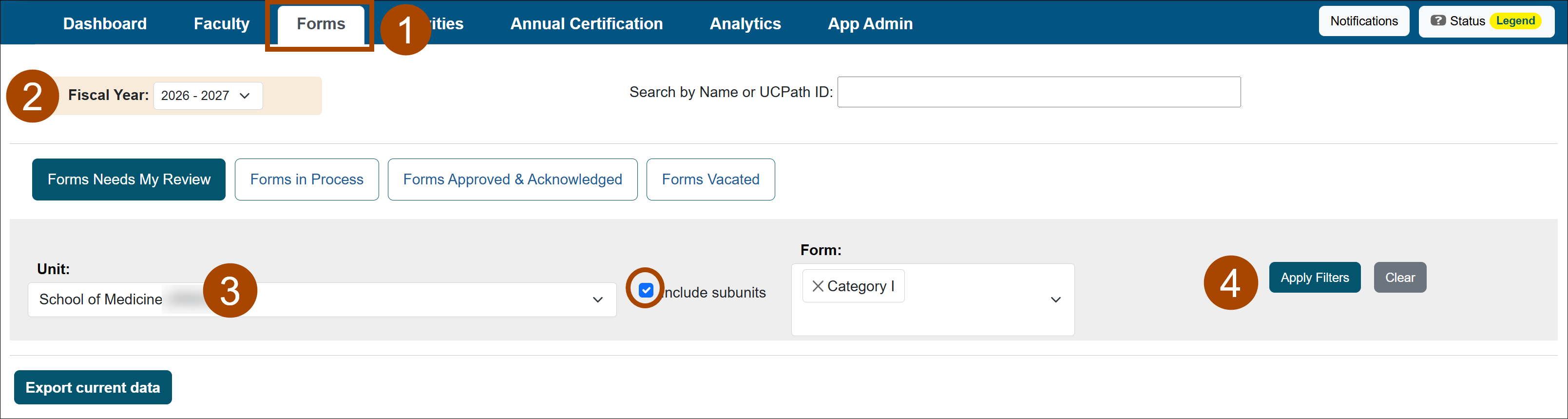
- Select the appropriate fiscal year.
- Select the organizational Unit, select Include subunits, and apply any additional search criteria as needed.
- Select Apply Filters.
Related Articles
All ReviewersCategory I forms
Category I: Organization Country Verification
Student Involvement forms
Exceed Threshold forms
Retain Earnings forms
Adding an Alternate Approver
Approval Form and AC Returned
Approvers cannot approve their own forms
Alert for Returned Forms
Forms Search - Include Subunits
Category I Watchlist
Last Modified:2026-11-06 10:07:03.487732-08