Home > Training > Application Administrator > Report Became User
Report Became User
The Become User Report tracks usage of the Become feature in UC OATS, which allows authorized users to access the system as another user for support or administrative purposes. This report identifies who initiated a Become session and provides visibility into when the feature was used for auditing and oversight.
Access the Report
To view and download the Become User report:
- Navigate to App Admin.
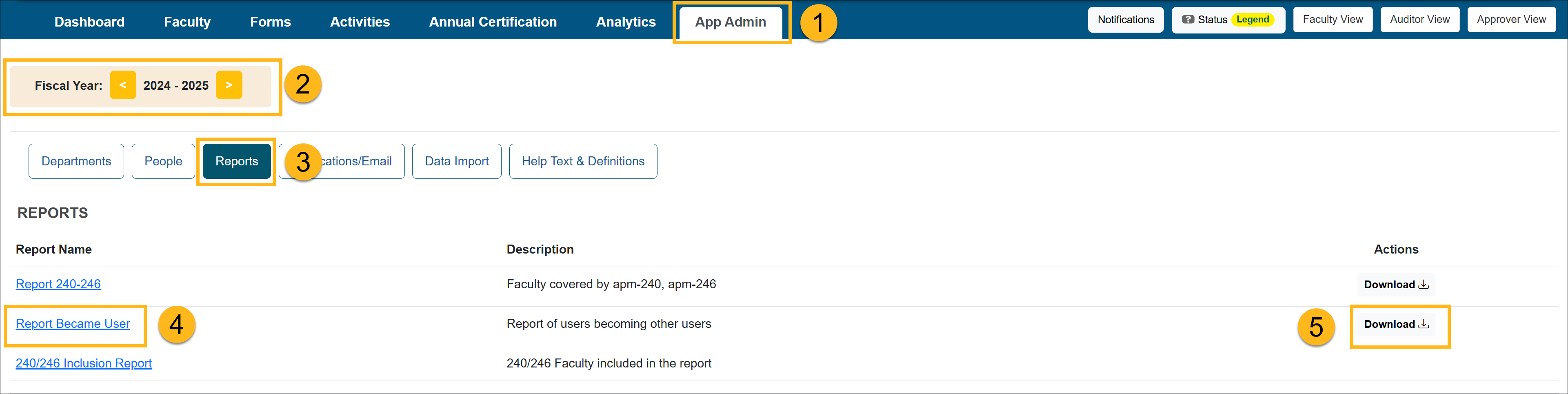
- Confirm you are in the correct fiscal year. Use the arrows to move forward and back through fiscal years.
- Select Reports.
- Click on the Report Became User link to view the report.
- Click the Download button to download the report.

Related Articles
Application Administrator
Report 240-246
Report Became User
240/246 Inclusion Report
Potential COI Activities
Vacated Forms
Faculty In-Kind Contributions
System Actions by Activity Category
Last Modified:2026-04-13 17:38:20.711066-07