Home > Training > Application Administrator > 240/246 Inclusion Report
240/246 Inclusion Report
The 240/246 Inclusion Report allows you to manage which faculty members are included in the 240–246 Report.
Inclusion can be managed in two locations:
- The 240/246 Inclusion Report
- The faculty member’s Faculty Details page
Only faculty assigned to the APM-240 or APM-246 policies will appear in this report.
The following will explain how to use the report:
- Navigate to App Admin.
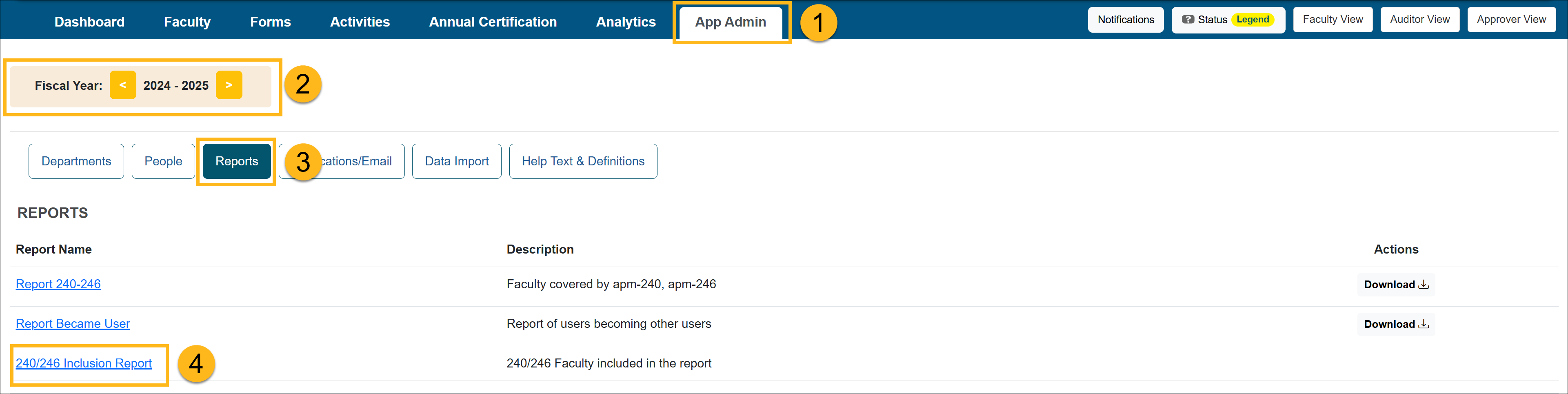
- Confirm you are in the correct fiscal year. Use the arrows to move forward and back through fiscal years.
- Select Reports.
- Select the 240/246 Inclusion report link
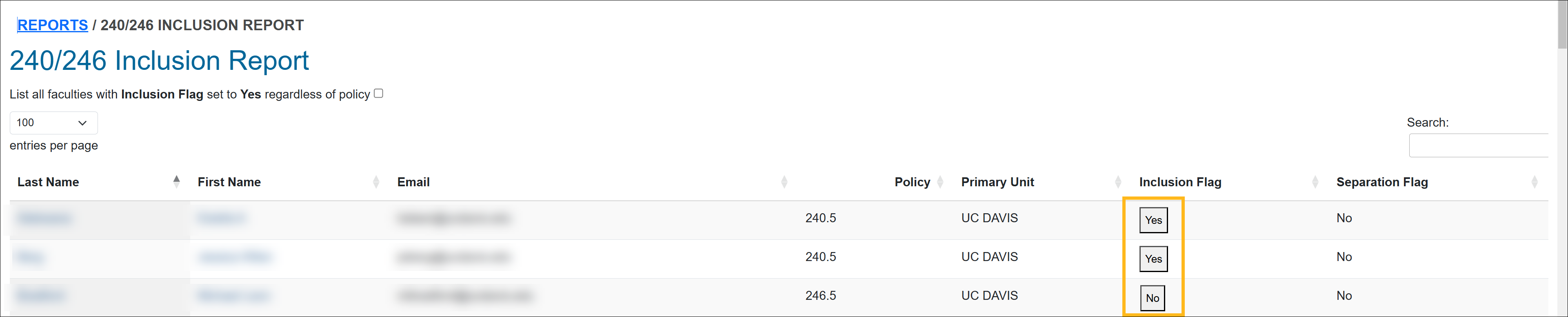
- View the report. The Inclusion Flag indicates if the faculty member is included in the UCOP 240/246 report. You can manage the faculty's inclusion status by clicking on the yes/no button.
Yes = Faculty is included in the 240/246 Report
No = Faculty is not included in the 240/246 Report
Related Articles
Application Administrator
Report 240-246
Report Became User
240/246 Inclusion Report
Potential COI Activities
Vacated Forms
Faculty In-Kind Contributions
System Actions by Activity Category
Last Modified:2026-04-13 17:48:53.891103-07