Home > Training > Faculty > Submit Annual Certification
Submit Annual Certification
This article provides step-by-step instructions for submitting your Annual Certification.
Annual Certification for the previous fiscal year becomes available starting July 1. You will receive an email reminder from your campus with details about your Annual Certification requirements. All faculty must submit Annual Certification, even if they did not engage in outside professional activities during the reporting period [APM-025, APM-671].
Tutorial videos
Watch the tutorial video to learn how to submit your Annual Certification.
Academic-year Faculty
Fiscal-year Faculty
Health Science Faculty
Important notes
The following are important notes about Annual Certification.
Important information about Annual Certification
- The Annual Certification report will only show hours that count against your threshold.
- Category III activities are not included in the Annual Certification report for General Campus and Health Science faculty. They are only included for Deans (APM-240) and Full-Time Faculty Administrators (APM 246).
- Annual Certification reports do not expire, so you may submit them after the deadline if needed.
- Denied Category I activities: Denied Category I activities with no reported effort/earnings are not included in the Annual Certification report.
- Pending Stock Valuation: Stock must be reviewed and valued by your campus Stock Evaluator before you can submit your Annual Certification.
Before you certify
Use the Fiscal Year indicators to navigate to the fiscal year you are certifying, then confirm the following:
- All required activities have been reported.
- All activities have reported time and earnings, as applicable.
- Stock valuation: Reported stock payments must be evaluated before you can submit your Annual Certification. [Learn more]
- All prior approval forms have been submitted. Forms that have not been submitted will show the Not Submitted status. Learn more
- Academic-year faculty: Submit your Summer Info before you submit your Annual Certification. [Learn more]
When your Annual Certification is due, you will see:
- An alert icon on the Annual Certification tab indicates that an action is required.
- An Annual Certification button is displayed above the dashboard.
- A notification in the Summary section reminds you to complete your submission.
To complete Annual Certification:
- Select the My Annual Certifications tab or the Submit Annual Certification button.

- Find the fiscal year you are certifying, then click the Proceed to Certification button. A message will appear if there are actions you must complete before submitting your Annual Certification, such as reporting effort, completing required forms, etc.

- Review the list of reported activities to confirm it is accurate. Enter your initials, then click the Submit Annual Certification button.
Please note: Your Annual Certification cannot receive final acceptance until all prior approval forms have been processed. As long as you have submitted your Annual Certification, no further action is required from you.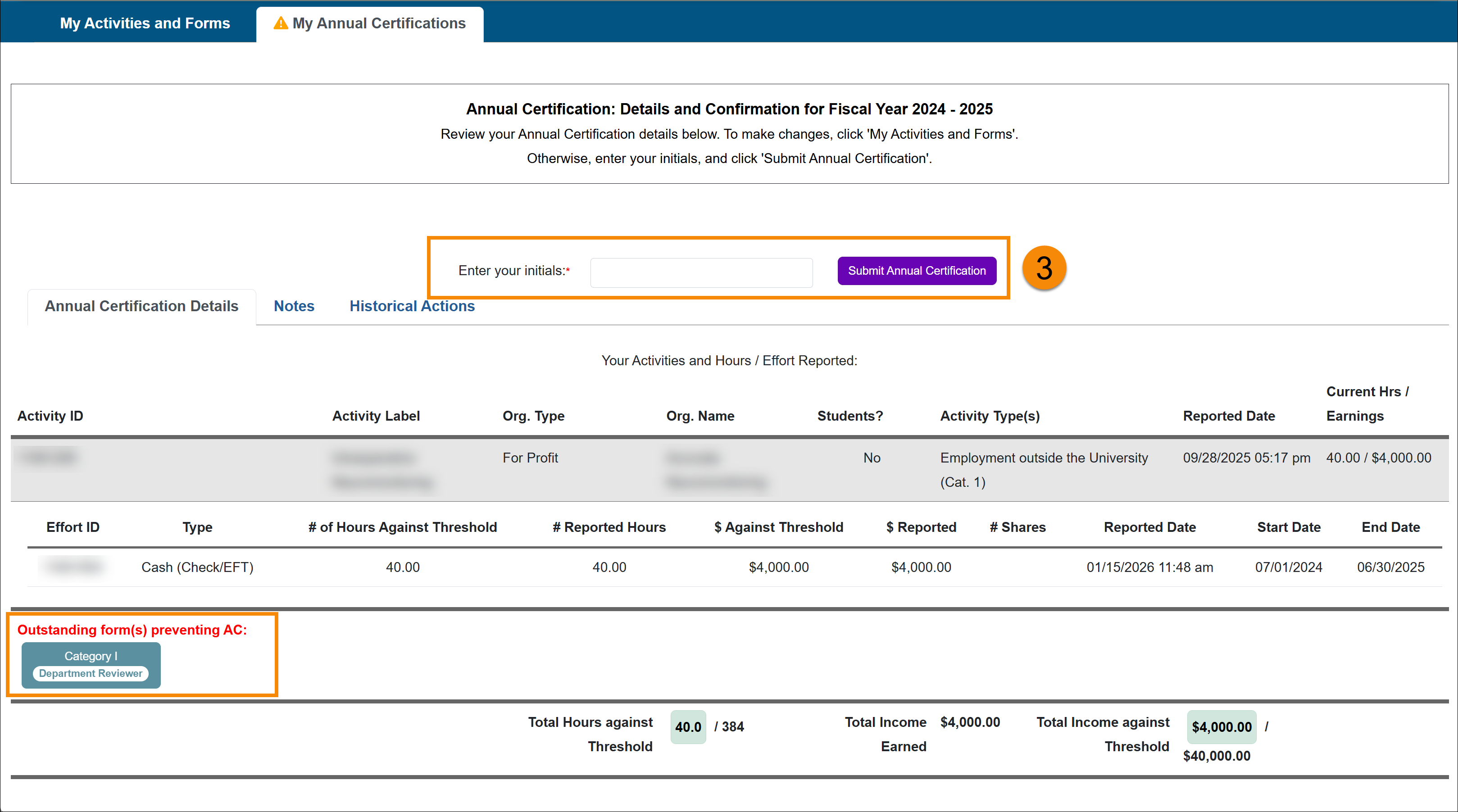
- Your Annual Certification has been submitted.

Academic-year: Summer Info
Academic-year faculty need to submit their Summer Information for both fiscal years before you can submit your Annual Certification.

If you did not engage in outside professional activities during the listed summers, you can check the box and proceed with Annual Certification.

Related Articles
All Faculty
Submit Annual Certification
Annual Certification - Action Required
View Annual Certification Details
Recall Annual Certification
Last Modified:2026-01-15 14:46:19.752538-08