Home > Training > Auditors > Workspace Overview
Workspace Overview
This guide explains how to navigate the UC OATS workspace and understand its key features. Use the sections below to learn how to move through UC OATS.
Tutorial Video
Watch the video to learn how to navigate your Auditor workspace.
Dashboard Tab
The Dashboard provides Auditors with a high-level, read-only view of activity and certification data across their assigned units. It includes visual summaries and fiscal year comparisons to support trend analysis, compliance monitoring, and institutional oversight.
Dashboard Tab Details
The Dashboard includes five summary-level reports that aggregate data across all units assigned to you in UC OATS.
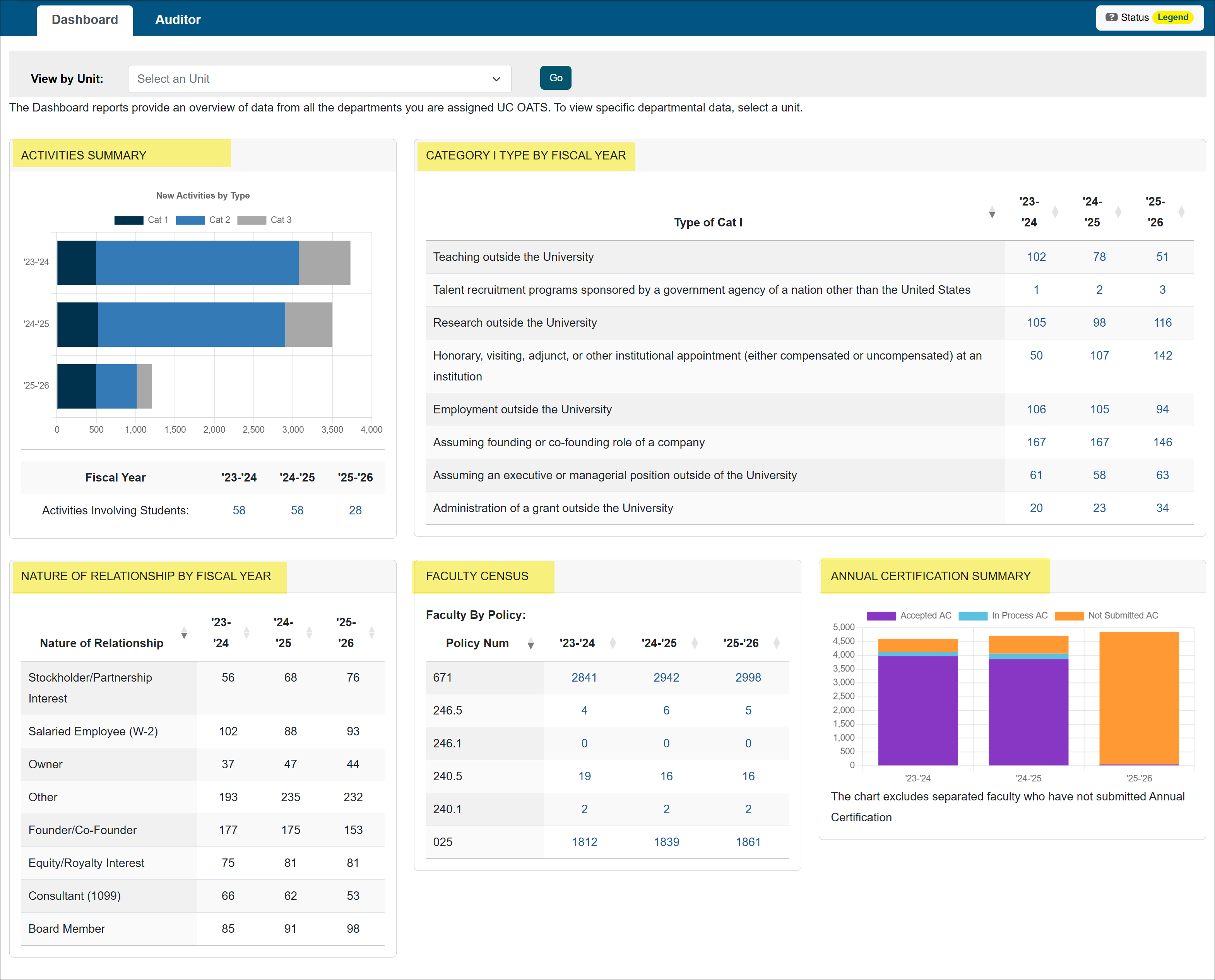
Select a Unit
To view data for a specific unit, select the unit and click Go.

Activities Summary
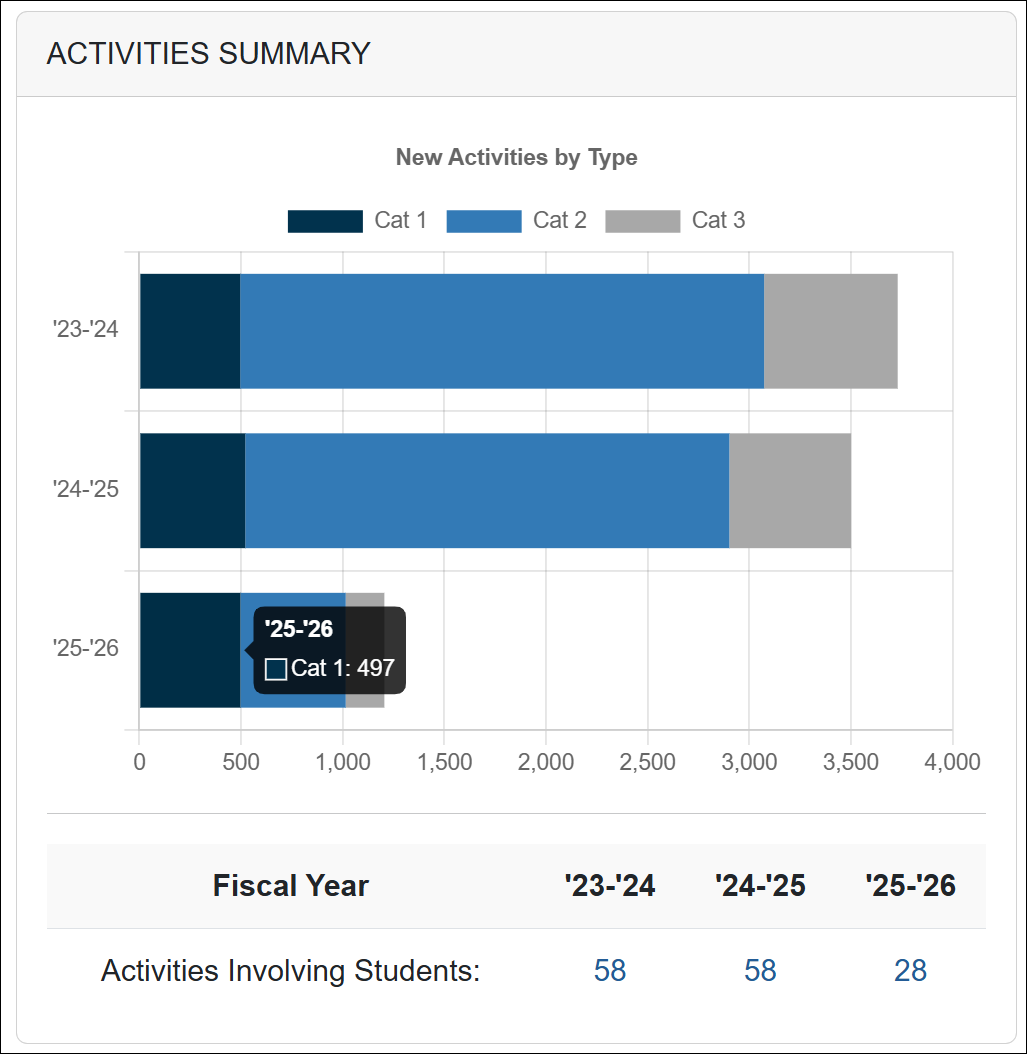
This section provides a breakdown of faculty activities entered into UC OATS by Category Type (I, II, and III).
- Hover over chart elements to view exact counts.
- Select the chart to navigate to the corresponding report (e.g., Auditor tab> All Activities> filter results).
Category I Type by Fiscal Year
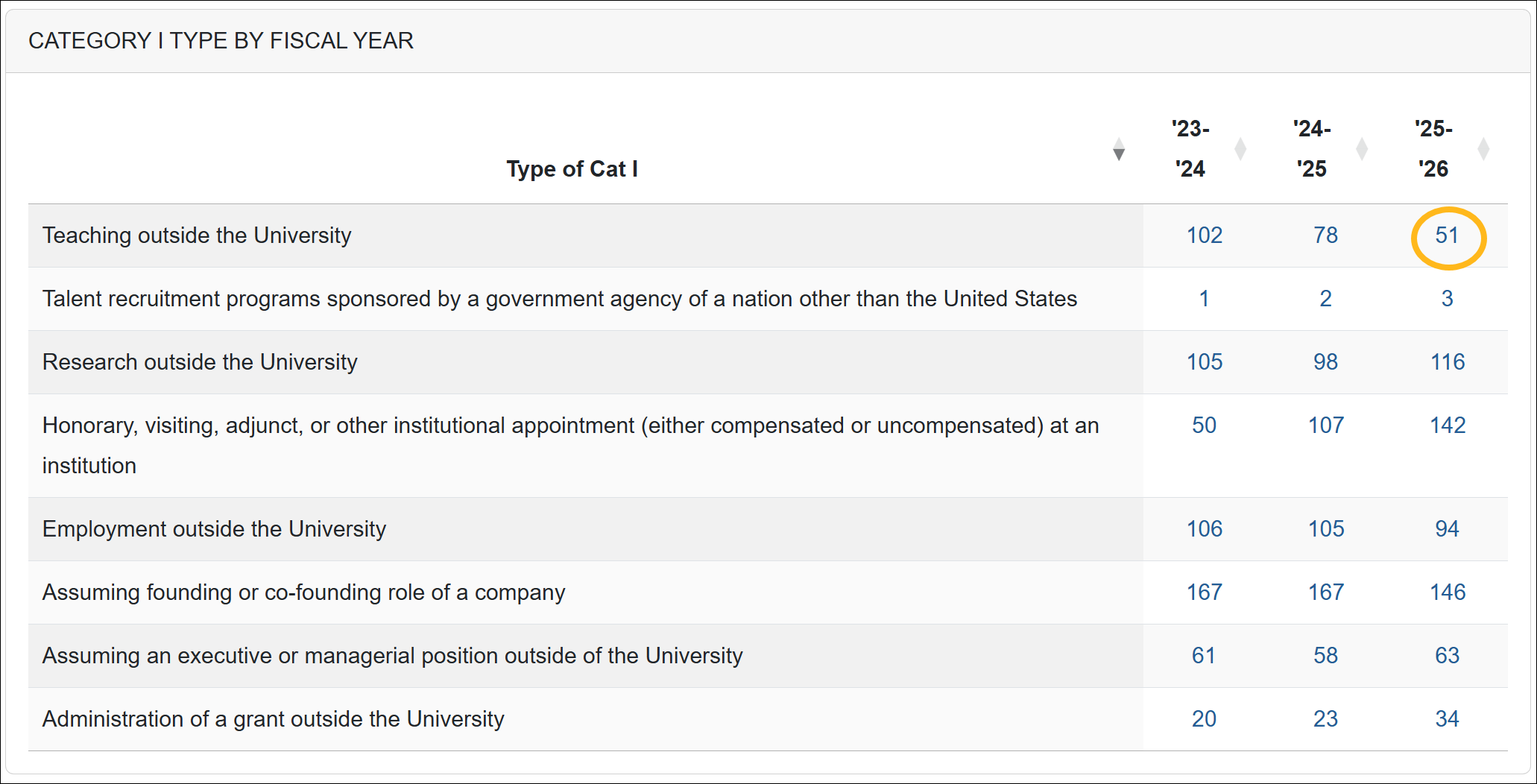
This section displays the number of each Category I activity type reported in UC OATS by fiscal year across your assigned units. Select a number to view the report (e.g., Auditor tab> All Activities> filter results).
Nature of Relationship by Fiscal Year
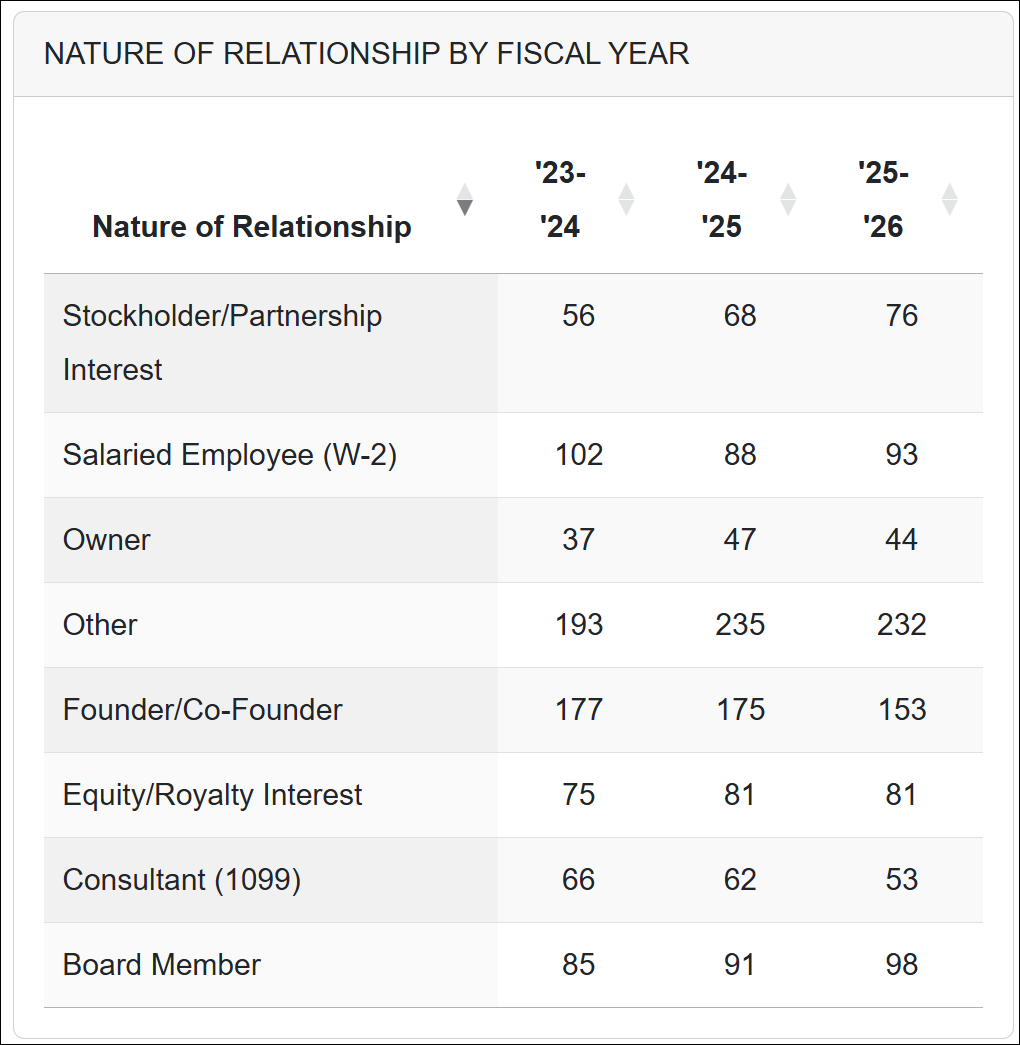
This section provides a breakdown of the Nature of Relationship options selected by faculty when submitting Category I forms. The report displays three fiscal years of data and summarizes selections across all assigned units by fiscal year.
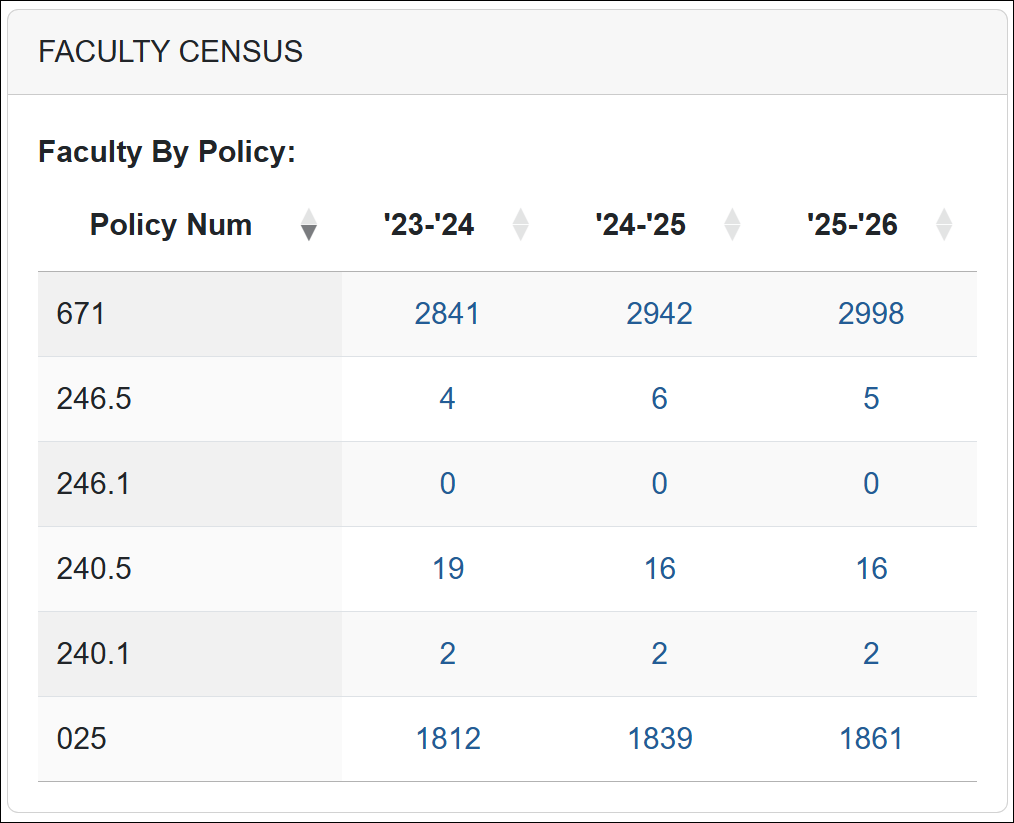
Faculty Census
This section displays the number of faculty members in UC OATS by policy type. Select the number to view the report (e.g., Auditor tab> All Faculty> Filter results).
Annual Certification Summary
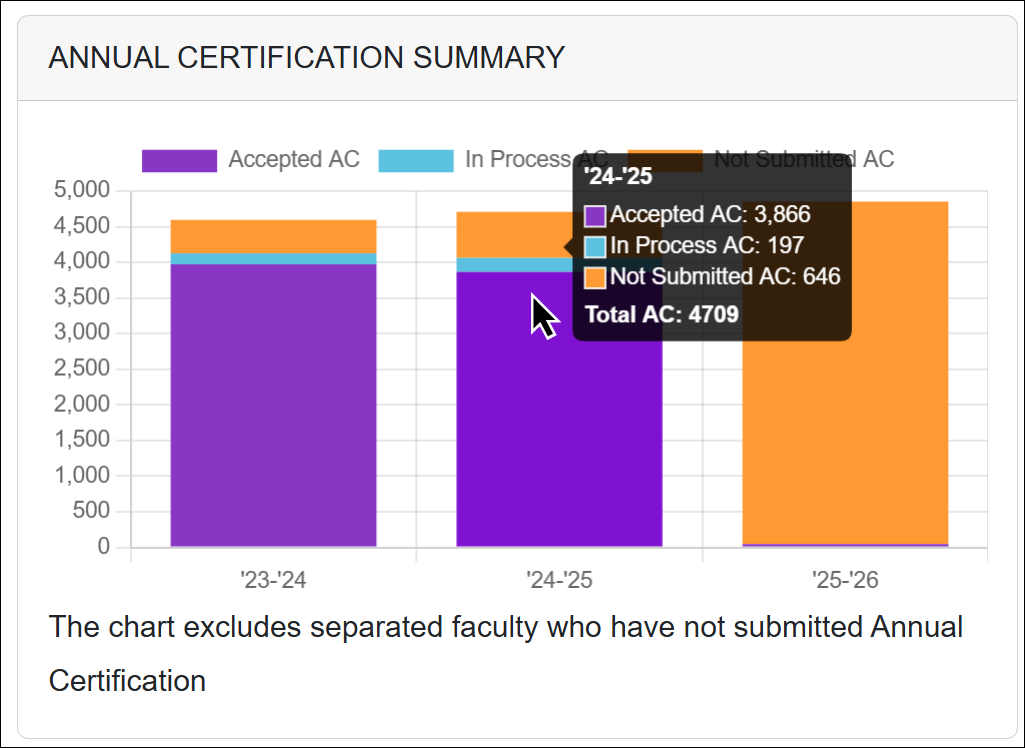
This section provides a fiscal year summary of the Annual Certification status for faculty within your assigned units.
- Hover over chart elements to view exact counts.
- Select the chart to navigate to the corresponding detailed report (e.g., Auditor tab> Annual Certifications> Filter results).
Auditor Tab
The Auditor tab allows users to generate reports on activities, forms, Annual Certification records, and faculty data. It also provides access to predefined (canned) reports, including the Potential Conflict of Interest (COI) Activities Report and the Intellectual Property (IP) Activities Report. View the sections below to learn more about each section.
All Activities
The All Activities section displays all prior approval forms for units you have access to. This includes forms currently in the approval workflow, approved forms, and forms that have not yet been submitted.
You can use a variety of filters to refine and locate specific activities.
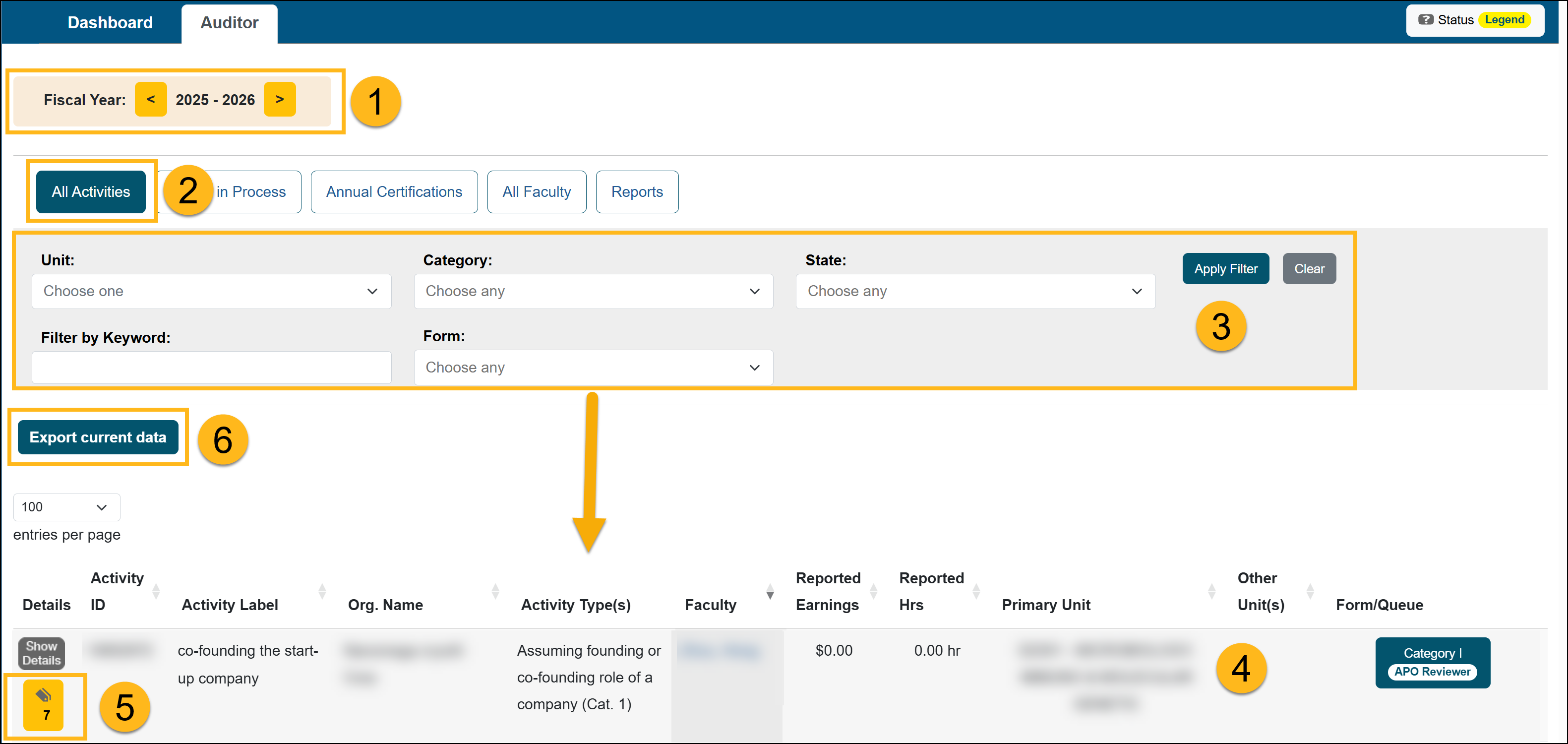
To locate specific types of activities in UC OATS, do the following:
- Ensure you are viewing the correct fiscal year.
- Click the All Activities button.
- Use Filters to refine results and then click Apply Filter.
- Unit: Select from the units assigned to you.
- Category: Filter by Category I, II, or III activities.
- State: Select the workflow queue where the form is currently located.
- Filter by Keywords: Enter search terms to locate specific forms.
- Form: Select the type of form you want to include in the results.
- View the list of results and select the forms to view the details, as needed.
- The form’s current status will display in the results list.
- Click on a form to open and review detailed information.
- Select the Show Details button to view reported effort and/or earnings details.
- Select the Notes button to view or add activity notes.
- Select Export Current Data to download the filtered results into an Excel spreadsheet.
Forms in Process
The Forms in Process queue contains prior approval forms currently progressing through the approval workflow.
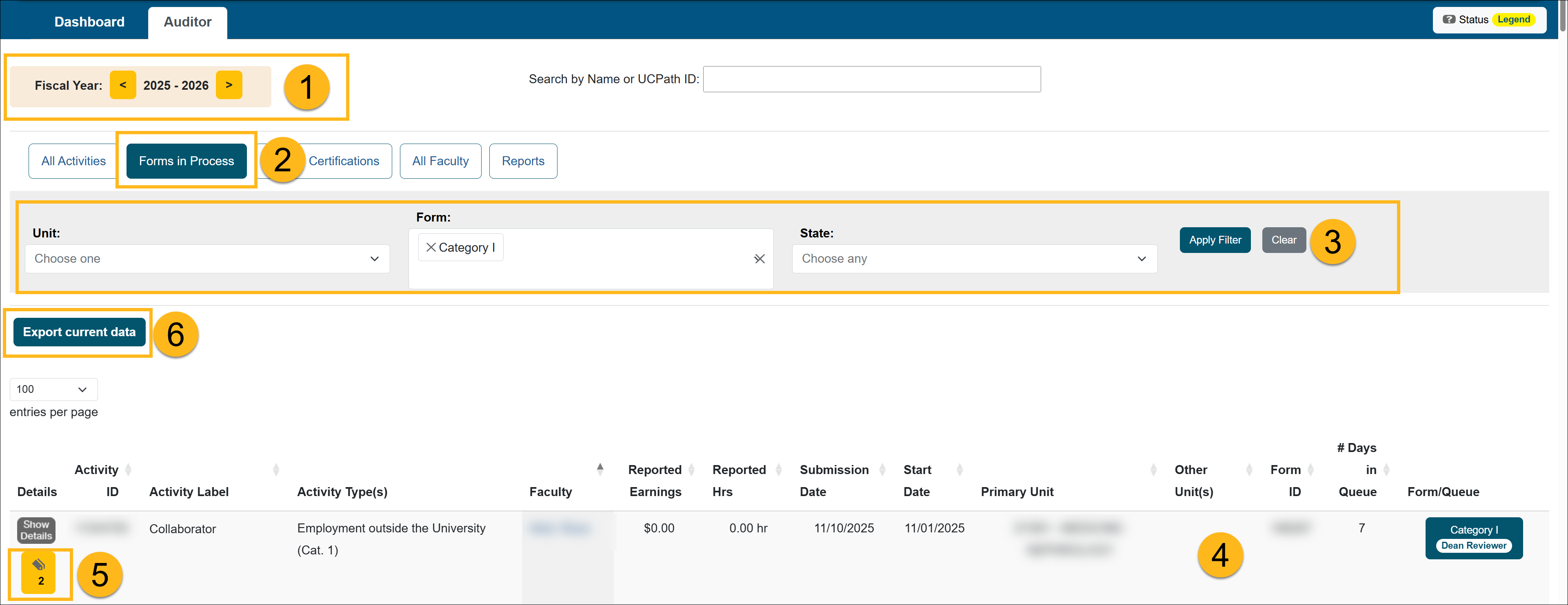
To locate a form that is currently in workflow, do the following:
- Ensure you are viewing the correct fiscal year.
- Click the Forms in Process button.
- Use Filters to refine results.
- Unit: Select from the units assigned to you.
- Form: Choose the form type (e.g., Category I, Student Involvement, etc.).
- State: Select the workflow queue where the form is currently located.
- View the search results.
- The form’s current status will display in the results list.
- Click on a form to open and review detailed information.
- Select the Show Details button to view reported effort and/or earnings details.
- Select the Notes button to view or add activity notes.
- Select Export Current Data to download the filtered results into an Excel spreadsheet.
Annual Certifications
There are four Annual Certification reports available to you in UC OATS: AC not submitted, AC in process, AC accepted, and AC All.
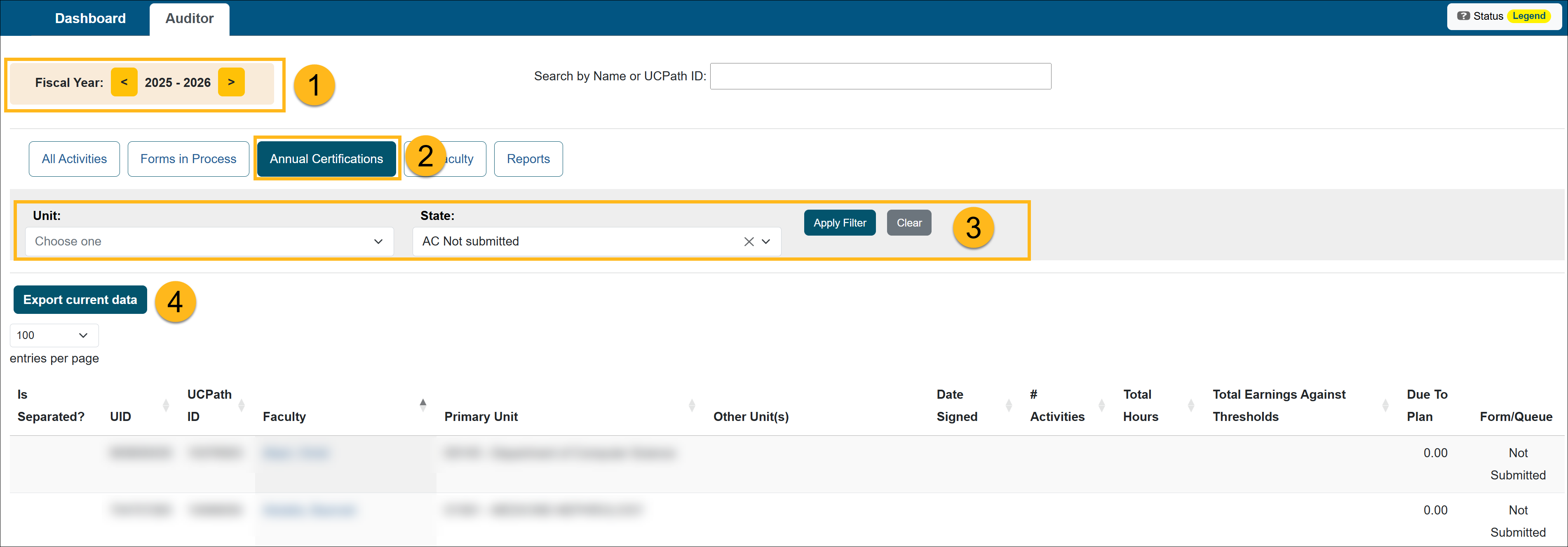
To access Annual Certification reports, do the following:
- Ensure you are viewing the correct fiscal year.
- Click the Annual Certifications button to open the certification report workspace.
- Apply the available filters to locate specific records:
- Unit: Select from the units assigned to you.
- State: Select the workflow status of the certification. Select a Report View. Choose one of the following report views:
- Forms Not Submitted – Displays faculty who have not yet submitted their Annual Certification. Results are limited to units assigned to you.
- Forms In Process – Displays certifications that have been submitted and are currently moving through the approval workflow.
- Forms Accepted – Displays certifications that have received final acceptance.
- Select Export Current Data to download the report into a spreadsheet.
All Faculty/Faculty details
The Faculty Details page grants read-only access to a faculty member's workspace. On this page, you can view the faculty members:
- Time/earnings threshold
- Reported outside activities
- Reported earnings/effort
- System emails
- System messages
- PDF of the approved annual certification report
- Faculty member's email preferences
To view the Faculty Details page:
- Ensure you are viewing the correct fiscal year.
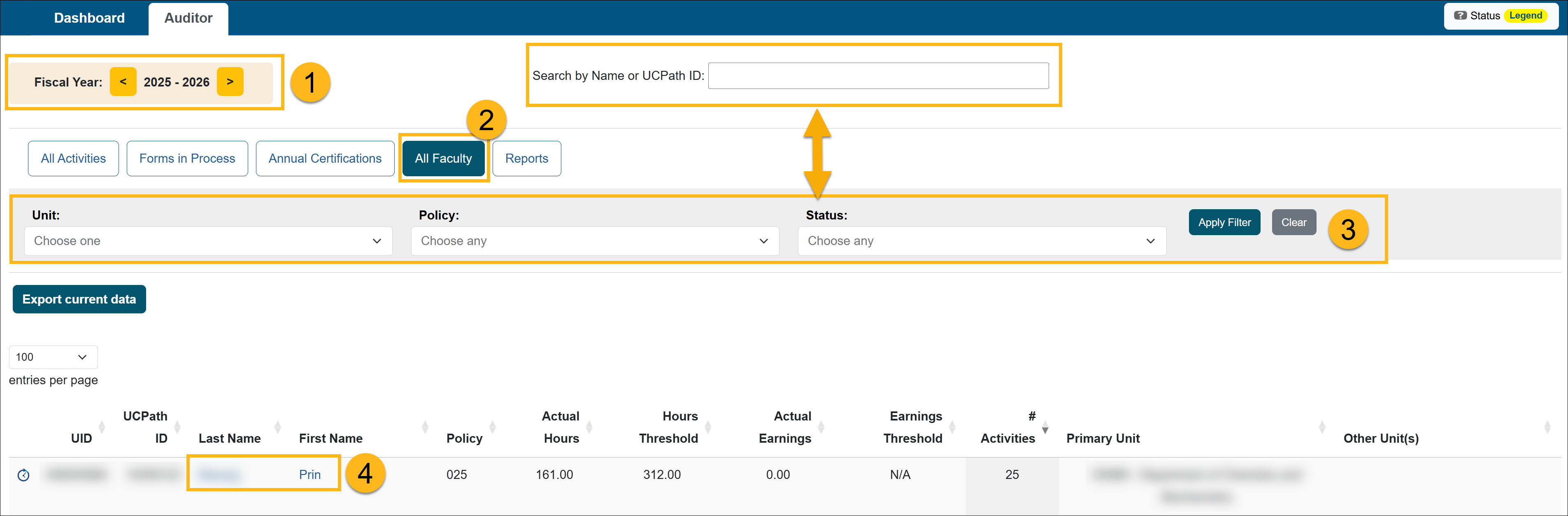
- Select the All Faculty button.
- Use the filters to locate the faculty member. You can also search for a faculty member by name or UC Path ID.
- Select the faculty member's name to view the Faculty Details page.
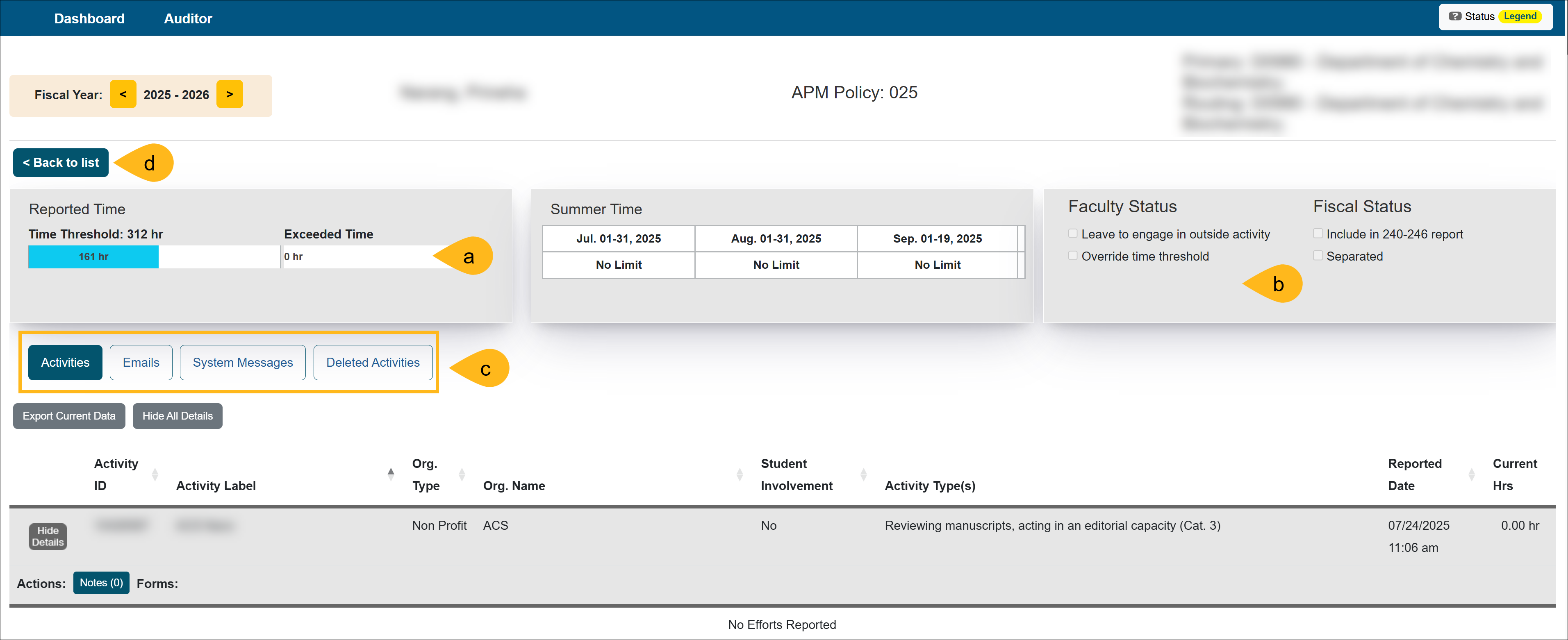
The Faculty Details page provides the following information:
- Time/Earnings Threshold: Shows the time/earnings thresholds and how much has been reported within the threshold and exceeding the threshold.
- Summer Time: Shows the Summer Time information for academic year faculty.
- Faculty Status/Fiscal Status: This section details the faculty's account.
- Not in good standing: This indicator is checked when the faculty is not in good standing.
- Leave to engage in outside activity: This is selected when the faculty member is on leave to engage in an outside activity. When this option is selected an indicator will appear next to the faculty's records in reports.
- Override earnings threshold: This shows if the faculty's earnings threshold has been overridden.
- Override time threshold: This shows if the faculty's time threshold has been overridden.
- Include in 240-246 report: This will include the faculty member in the 240-246 report that goes to UCOP annually.
- Separated: Shows if the faculty member was separated.
- Additional Options:
- Activities: The activity list shows all reported activities, reported earnings/effort, and prior approval forms for that faculty member.
- Emails: This section provides a record of all system-generated emails that have been sent to the faculty member, allowing you to review communication history as needed.
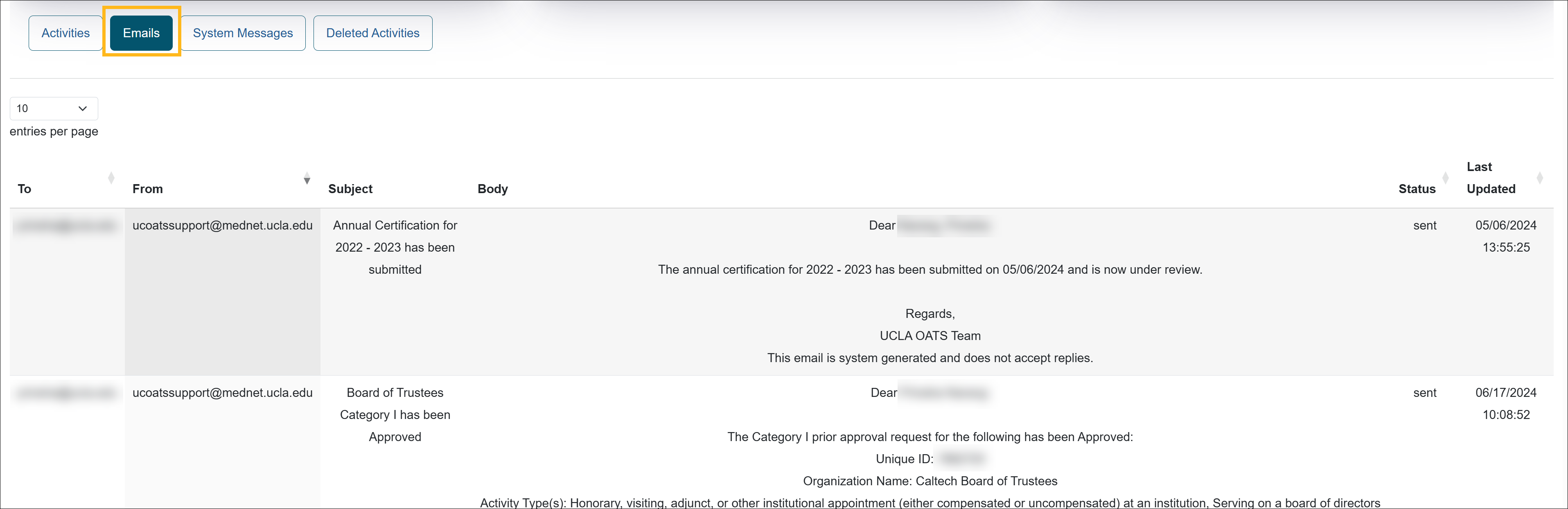
- System Messages: This section displays system-generated alerts, providing insight into any notifications or warnings related to the faculty member's account.

- Deleted Activities: This section lists activities that have been removed from the faculty's workspace.

- Back to list: Click to return to the list of faculty
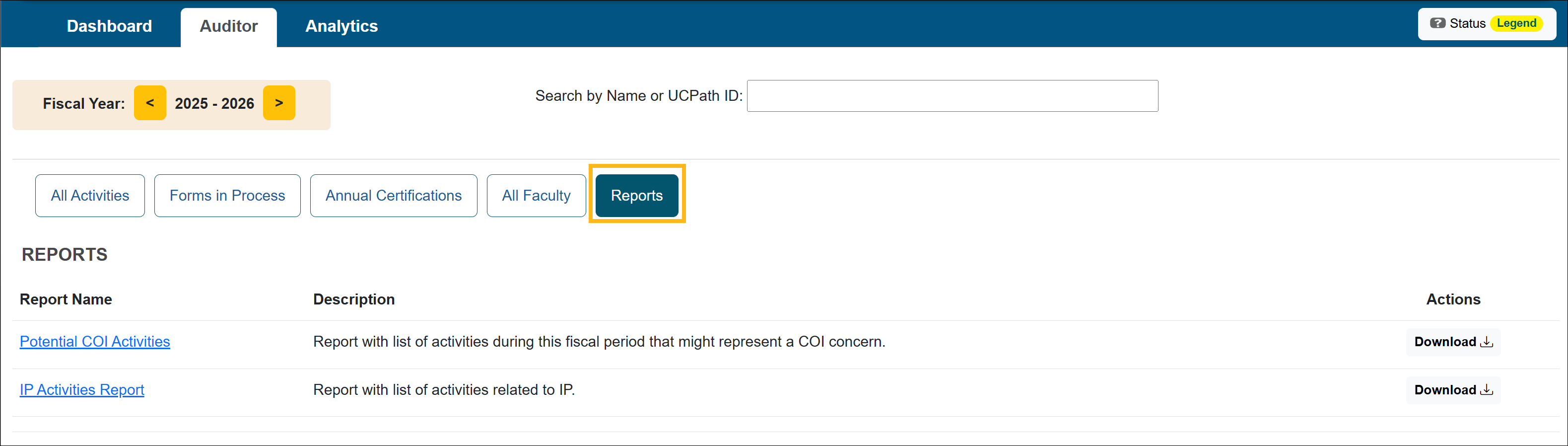
Reports
There are currently two reports available: Potential COI Activities and IP Activities Report.
Related Articles
Auditors
What is UC OATS?
Log in to UC OATS
Auditor's Role Overview
Workspace Overview
Outside Activity Types & Help Text
Last Modified:2026-03-02 10:30:35.784111-08