Home > Training > Application Administrator > Add New/Manage Department Details
Add New/Manage Department Details
This article will guide you through the process of adding new departments and managing department information.
When adding a new department, ensure the department code is unique and matches the code in UCPath.
To add a new department:
- Click on the App Admin tab.
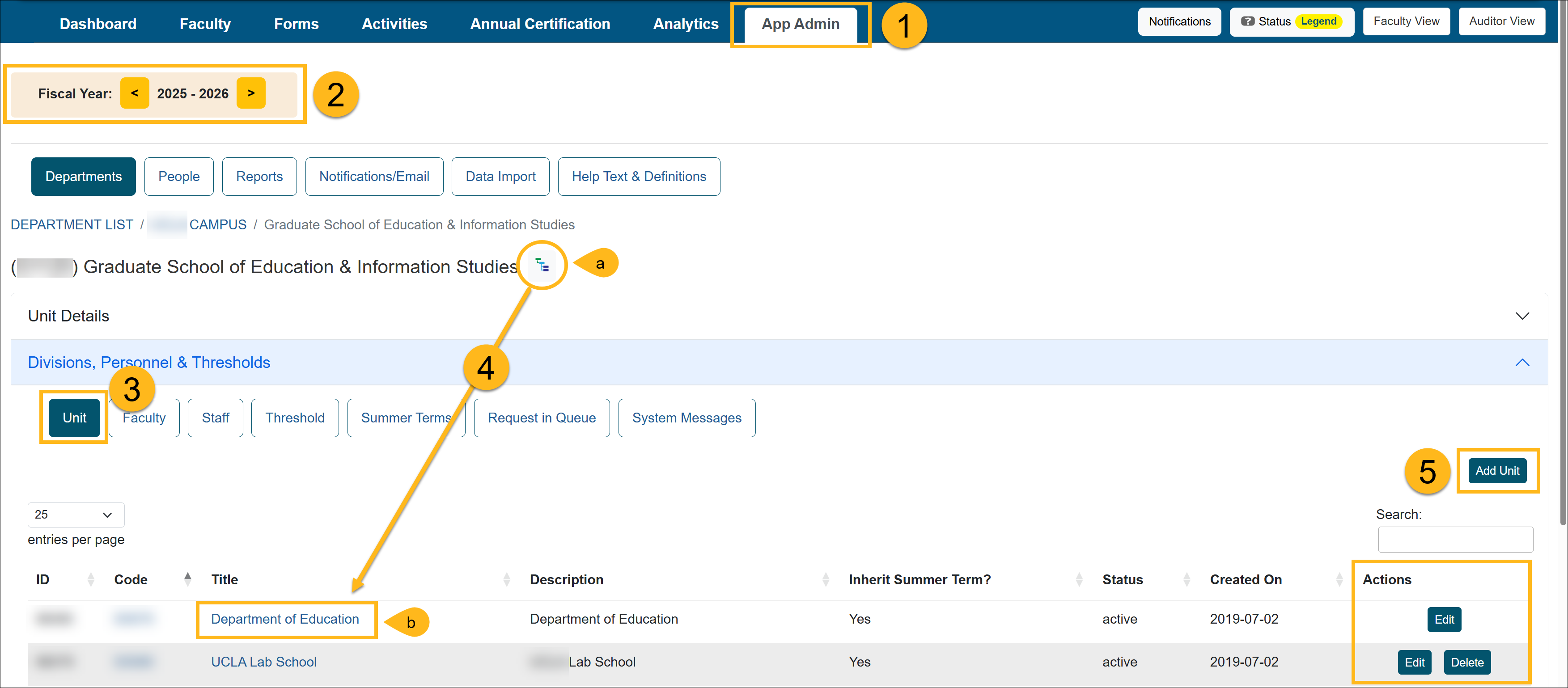
- Confirm you are in the correct fiscal year.
- Select the Unit button.
-
Identify the parent unit where the new unit should be placed.
(a) Use the Department Hierarchy Tree Structure, or
(b) Select the Title links to drill down to the correct department. - Click the Add Unit button. To edit a department, select the Edit button
- Fill out the New Unit form. View the Department Data Elements Description table below to learn about each of the fields.
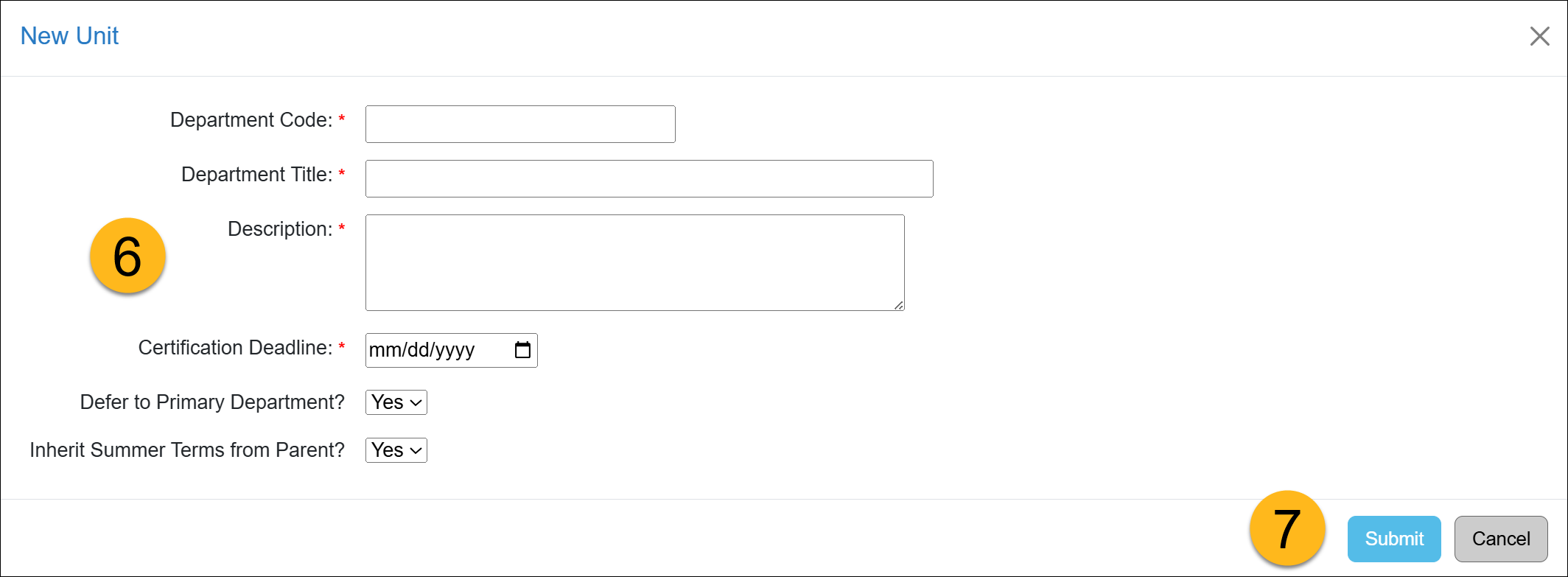
- Click the Save button to complete the changes.
Department Data Elements Description:
| Data Element Name | Description | Max size | Required (Y/N) | Accepted Format | Example | Note |
|
Department Code |
A unique ID number that does not change over the lifetime of an organizational unit. This ID will serve as a unique identifier in UC OATS to identify the organizational unit and associate incoming data. |
100 characters | Y |
Alphanumeric |
1400, must be unique within a campus. |
This field will be used to identify departments, divisions, schools, and organized research units (ORUs). |
|
Department Title |
The name of the organizational unit in association with the dept_code provided. This is the label that is visible to all UC OATS users. |
500 characters | Y | Text; spaces, hyphens, and apostrophes accepted |
Department of Biological Chemistry |
This field may be overridden by individual faculty parameters (e.g., BiolChem) |
|
Description |
The dept_code of the parent organizational unit for this organizational unit. This field will be used to map the hierarchy of organizational units and is used for routing and approval. If this is the root-level unit, leave the field blank. |
100 characters | Y | Alphanumeric | For the unit, Division of Hematology (dept_code = 1234) within the Department of Medicine (dept_code = 5678), the parent_unit_code for Hematology should be "5678", and the parent_unit_code for Department of Medicine should be the code for UCLA |
A top level unit on a campus will have no parent. For example, UCLA is the top-most unit in the tree and will have a NULL value for this variable. |
|
Certification Deadline |
The month and day of each year the annual certification is due. This is a usable variable in the email reminders to the faculty. This date can be unit-specific. |
date | Y |
MM/DD |
The certification deadline is a usable variable in the email reminders to faculty. If you use this variable in the email template, the month and day when annual certification is due will be automatically inserted in the email notification. |
Reminder email notifications can be disabled by campus administrator. |
| Skip unit and route to parent? | Select "Yes" if you would like the review process to begin at the one level up at the parent level. Select "No" if you would like the review process to begin at the new unit level. |
Yes/No | N | Yes/No | ||
|
Defer to Primary Department? |
For faculty with multiple appointments in different departments, this parameter will define if only the primary department should be executing the review and approval process. The other departments will rely on the primary department for review of forms submitted. | 1 character | Y | 1 = Yes 0 = No |
A faculty has a dual appointment in the Department of MIMG and the Department of Biology, and MIMG is his primary appointment. Biological Chemistry has elected NOT to require parallel review and will rely on the primary department, and so this value is "1" for Biological Chemistry |
Note: this is a department-wide setting and will be applied to all cases where faculty has a non-primary appointment in this department. |
| Inherit Summer Term from Parent? | Select "Yes" if the unit should have the same summer term as the parent level. Select "No" if the unit should have a different summer term than the parent unit. |
|||||
| Fiscal Year | Enter the fiscal year for the new unit. | 2019 |
Related Articles
Application Administrator
Add/Manage Departments
Set Custom Thresholds
Set Summer Term
Requests in Queue/System Messages
Route Forms to Parent Unit
Last Modified:2026-03-26 16:04:34.37254-07