Home > Training > Cat I Prior Approval Non-Compliance
Category I Prior Approval Non-Compliance Report
This guide provides an overview of the Category I Prior Approval Non-Compliance Report.
This report provides insight into potential non-compliance for Category I Prior Approval activities. It includes both faculty self-reported responses and staff responses regarding whether an activity began before receiving approval.
Access the Report
To access the Cat I Prior Approval Non-Compliance report:
- Select the Analytics tab.
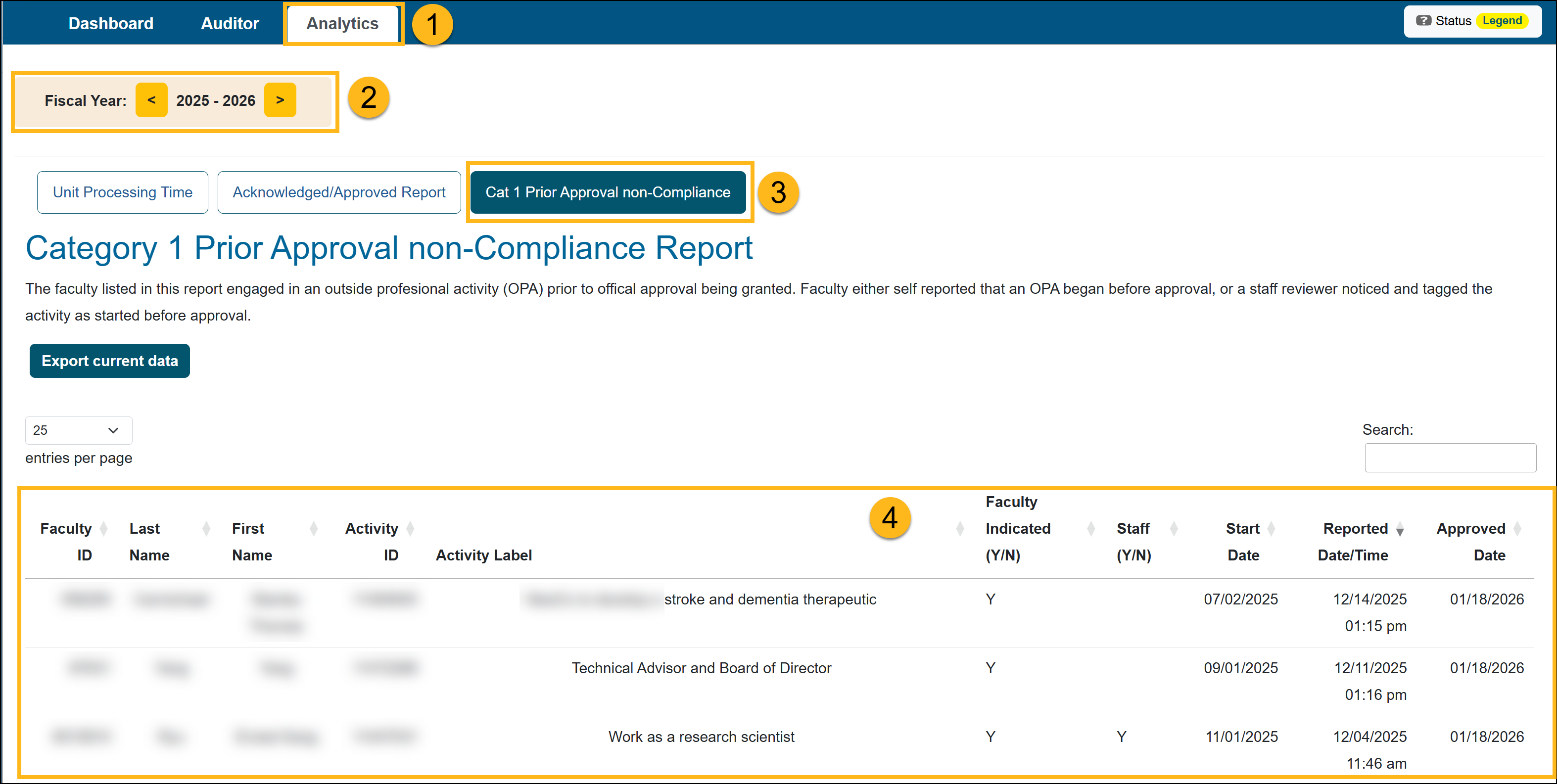
- Confirm you are in the fiscal year for the report.
- Select the Cat I Prior Approval Non-Compliance button.
The report displays all Category I forms submitted for the selected fiscal year. It also shows how faculty and staff answered the “Have you engaged in the activity before receiving permission?” question.The report includes the Staff Note when a Reviewer or Approver answers Yes to the question after the faculty member originally answered No. This note is required and documents the reason for the staff response.
Category 1 Prior Approval Non-Compliance Report Fields
| Field | Description |
| Faculty ID |
A Faculty ID is a unique system-generated identifier assigned to each faculty member when they are added to UC OATS. This ID is used to distinguish faculty records within the system and ensure that all activities, forms, and approvals are accurately associated with the correct individual. The Faculty ID remains consistent even if certain faculty details (such as name, department, or role) change over time, allowing for reliable tracking and reporting across the system. |
|
Last Name |
Faculty's last name. |
| First Name | Faculty's first name. |
| Activity ID |
An Activity ID is a unique system-generated identifier assigned to each Outside Professional Activity (OPA) record in UC OATS. This ID is used to distinguish individual activities and ensures that all related forms, approvals, and updates are accurately tied to the correct activity. Each Activity ID is specific to a single activity and remains consistent throughout its lifecycle, allowing users to track, reference, and report on that activity within the system. |
| Activity Label |
An Activity Label is a user-defined name created by the faculty member when entering an Outside Professional Activity (OPA) into UC OATS. This label is used to describe the activity in a way that is meaningful and easily identifiable to the faculty member and reviewers. The Activity Label helps distinguish between multiple activities and provides a quick reference when viewing, managing, or reporting on OPA records within the system. |
| Faculty Indicated |
Faculty Indicated is a field on the Category I Prior Approval form where faculty self-report whether they began an Outside Professional Activity (OPA) before receiving official approval. This field captures the faculty member’s acknowledgment of potential non-compliance and is used to help identify activities that may have started prior to approval. Responses in this field are based on the faculty member’s input and should be considered alongside system data (such as Start Date and Approved Date) for verification. |
| Staff Indicated |
Staff Indicated is a field on the Category I Prior Approval form that allows reviewers and approvers to indicate whether a faculty member has engaged in an Outside Professional Activity (OPA) prior to receiving approval. This field is based on the reviewer’s or approver’s assessment and may be updated to “Yes” if they have reason to believe the activity began before approval was granted. It serves as an additional validation point alongside the faculty’s self-reported response. |
| Start Date |
Start Date is the date the faculty member indicates their Outside Professional Activity (OPA) begins when submitting a Category I Prior Approval form. This date reflects when the activity is expected to start (or has already started). |
| Reported Date/Time |
Reported Date/Time is the date and time the faculty member entered their Outside Professional Activity (OPA) in UC OATS. This timestamp reflects when the activity was officially entered into the system. |
| Approved Date |
Approved Date is the date the Category I Prior Approval form receives final approval or acceptance. This date reflects when the approval process is completed, and the activity is officially authorized. |
| Activity Started before approval (computed) (Y/N) | This field automatically calculates whether an activity began before it was approved by comparing the Start Date to the Approved Date. If the Start Date is earlier than the Approved Date, the field will display “Y”, indicating the activity may be out of compliance. |
| Staff Note |
The Staff Note field is required when a Reviewer or Approver answers Yes to Has the faculty engaged in the activity before receiving permission? after the faculty member originally answered No. When this occurs, the Reviewer or Approver must enter the reason for their response. The note is then documented in the report. |
Related Articles
Analytics Role Overview
Unit Processing Time Report
Acknowledged/Approved Report
Cat I Non-Compliance Report
Potential Foreign Influence Report
Last Modified:2026-04-13 10:36:24.95475-07