Home > Training > Approver > Annual Certification Reports
Annual Certification Reports
This guide explains how to view Annual Certifications that have not yet been submitted, as well as those at different stages of the review process.
To access the Annual Certification reports:
- Use the Fiscal Year indicator to locate the applicable fiscal year.
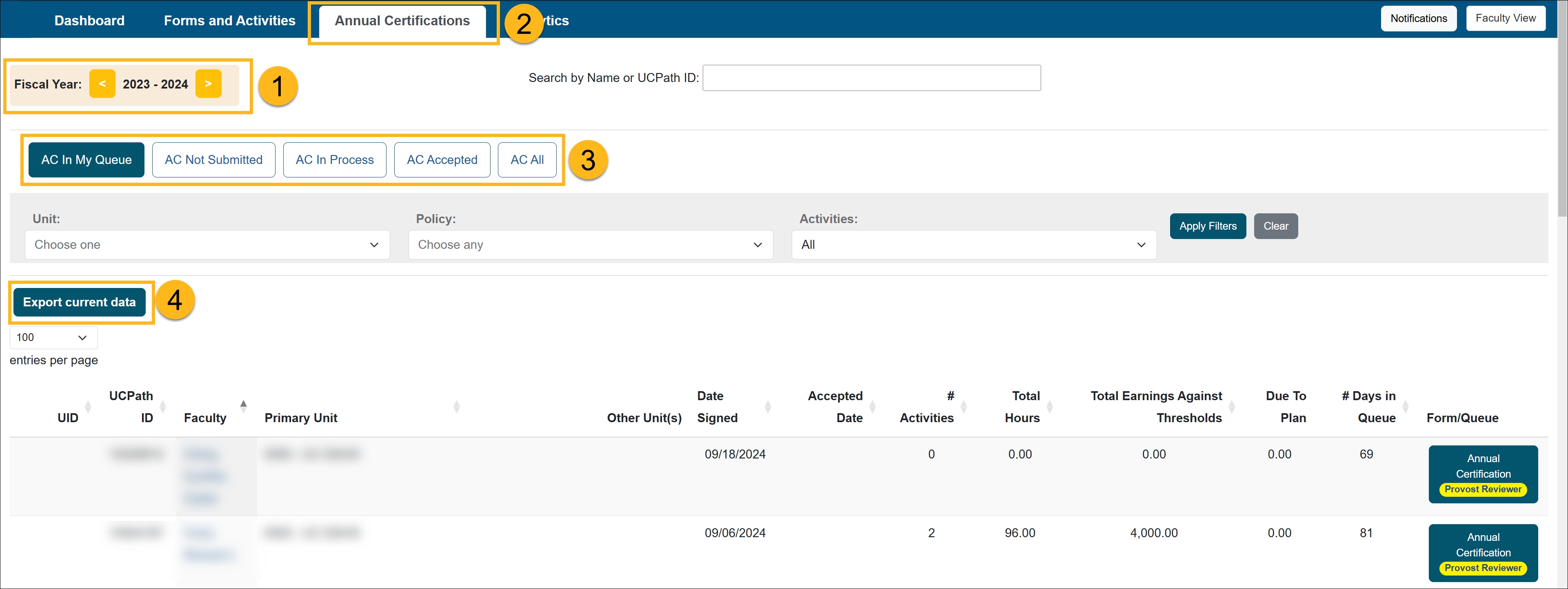
- Select the Annual Certifications tab.
- There are four reports available:
- AC Not Submitted: Displays faculty who have not submitted their Annual Certification, as well as reports that have been returned for revision.
- AC In Process: Displays reports that have been submitted and are currently progressing through the approval workflow.
- AC Accepted: Displays reports that have received final acceptance. A PDF version of each certification can be viewed or downloaded.
- AC All: Displays all faculty within your unit and shows submission status, including those who have not yet submitted.
- To export a report, click Export Current Data to download it as a spreadsheet.
Related Articles
All ApproverReview Annual Certification
Bulk Review Annual Certification
Annual Certification Reports
AC with Outstanding Forms
AC Not Submitted Watchlist
Last Modified:2026-02-27 14:58:02.878751-08