Home > Training > Application Administrator > UC OATS Structure
UC OATS Structure
This article provides an overview of the UC OATS Application Administrator structure, including how key areas of the system are organized to support campus configuration, user management, and compliance oversight.
Organizational Structure - 4 Levels
UC OATS has four organizational levels. The lowest level is four and the highest level is one.
|
Level |
Name |
Note |
|
1 |
Campus Level: Academic Affairs |
This is the top-level where most forms receive final approval or denial. |
|
2 |
School Level: Dean’s Office |
|
|
3 |
Department |
|
|
4 |
Division |
This is the lowest level of routing supported. At this level, there is only a reviewer. |
UC OATS uses a sequential, level-based routing structure. When a faculty member submits a prior approval form, it will be routed up through each level, beginning with the level where the faculty member's appointment is located. Some forms require final approval at the top level (Category I, Exceed Threshold, Retain Earnings), while other forms may only require review at the department level (Annual Certification, Student Involvement). The approval requirements may vary by campus.
Forms route sequentially by level; they may start at a higher level, but skipping levels is not supported.
For example:
Faculty at a division level
- Category I form: Division → Department → School → Campus
Faculty is at the department level
- Category I form: Department → School → Campus
Role-Based System
UC OATS is a role-based system, meaning that access and responsibilities are assigned through roles rather than individual permissions. Users can be assigned more than one role in UC OATS.
Roles:
- Faculty
- Reviewer
- Approver
- Alternate Approver
- Auditor
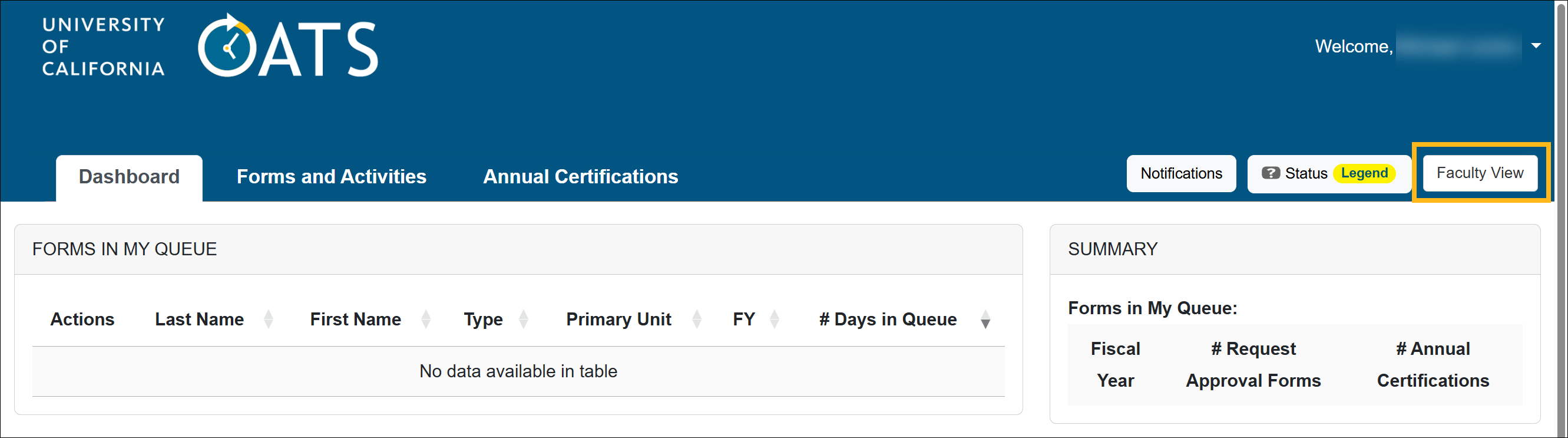
Each of these roles has its own user interface, so users assigned to more than one role will be able to switch between user interfaces.
For example, this person is assigned both an Approver and a Faculty role. They can toggle between each role.
Role Modifiers
There are also several role modifiers available to give staff access to additional features in UC OATS.
Modifiers:
- AC Not Submitted Watch List
- Analytics User
- Cat I Approver Watch List
- Faculty Status Change
- Historical Data Manager
- Stock Evaluator
Campus Level Settings
There are a couple of settings that are set up at the campus level and are inherited by all units.
Campus Time and Earnings Thresholds
UC OATS is designed to align with University of California policies governing outside professional activities, including:
- APM-025 – Outside Professional Activities
- APM-671 – Health Sciences Compensation Plan
Based on these policies, UC OATS automatically sets default time and earnings thresholds for each campus.
- Academic-year faculty: 312 hours (39 days)
- Fiscal-year faculty: 384 hours (48 days)
- Health Science faculty: $40,000 or 40% (scale 0)
However, campuses and units have flexibility in how these limits are applied:
- Units may set more restrictive time limits than the maximum allowed by policy. However, units cannot exceed the policy limits defined by APM-025 or APM-671.
This allows departments or schools to apply stricter internal controls while remaining compliant with UC policy.
Summer Terms
The Summer Term is set by the App Admin at the campus level and is inherited by all schools, departments, and divisions on the campus.
Related Articles
Application Administrator
Log in to UC OATS
UC OATS Structure
Workspace Overview
UC OATS Servers
End of Fiscal Year Checklists
Last Modified:2026-03-12 16:08:36.836106-07